
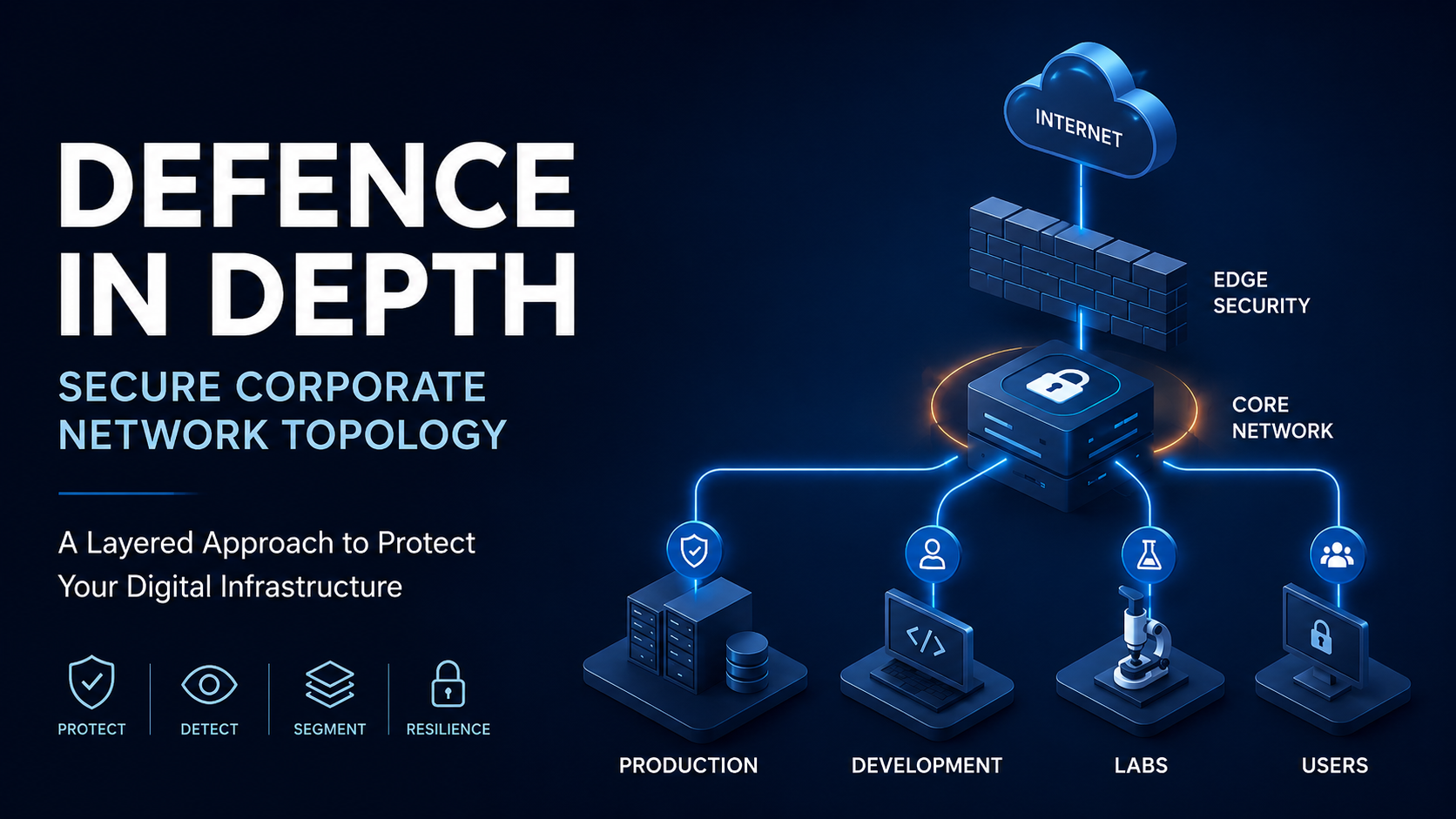
Defence in depth Secure Corporate Network Topology
Modern organisations face increasingly sophisticated cyber threats. Today, ransomware groups, insider threats, supply chain attacks, credential theft, and advanced persistent threats target businesses of every size. As a result, building a secure corporate network is no longer optional. Instead, it has become a fundamental requirement for operational continuity and digital resilience.
A modern enterprise network must do far more than provide internet connectivity. It should isolate critical systems, monitor suspicious behaviour, secure internet-facing services, protect internal infrastructure, and reduce lateral movement opportunities.
This guide demonstrates a practical defence-in-depth enterprise architecture designed around layered security, segmentation, monitoring, and controlled trust boundaries. Unlike overly simplified corporate diagrams, this topology reflects a realistic hybrid environment containing production systems, development infrastructure, secure research environments, VPN isolation, monitoring systems, and segmented laboratory networks.
What Is a Secure Corporate Network?
A secure corporate network is an enterprise infrastructure designed to protect systems, applications, users, and sensitive business data from unauthorised access, cyberattacks, and operational disruption.
Traditionally, organisations relied heavily on perimeter firewalls and antivirus software. However, modern attackers routinely bypass traditional perimeter-based defences. Therefore, enterprises now use layered security models that protect infrastructure at multiple levels.
A modern secure corporate network commonly includes:
- Network segmentation
- Internal firewalls
- VPN isolation
- Endpoint security
- Secure DNS architecture
- Threat monitoring
- Web application protection
- Access control systems
- Security logging and alerting
The primary objective is straightforward: if one layer fails, another layer should detect, contain, or block the attack. This concept is known as Defence in Depth.
Before You Continue — Recommended Reading
The architecture covered in this guide builds on core networking and protocol concepts. If you are unfamiliar with how the OSI model, TCP/IP, or DNS work at a foundational level, the articles below will significantly improve your understanding of why each security layer in this topology exists and what it is protecting against.
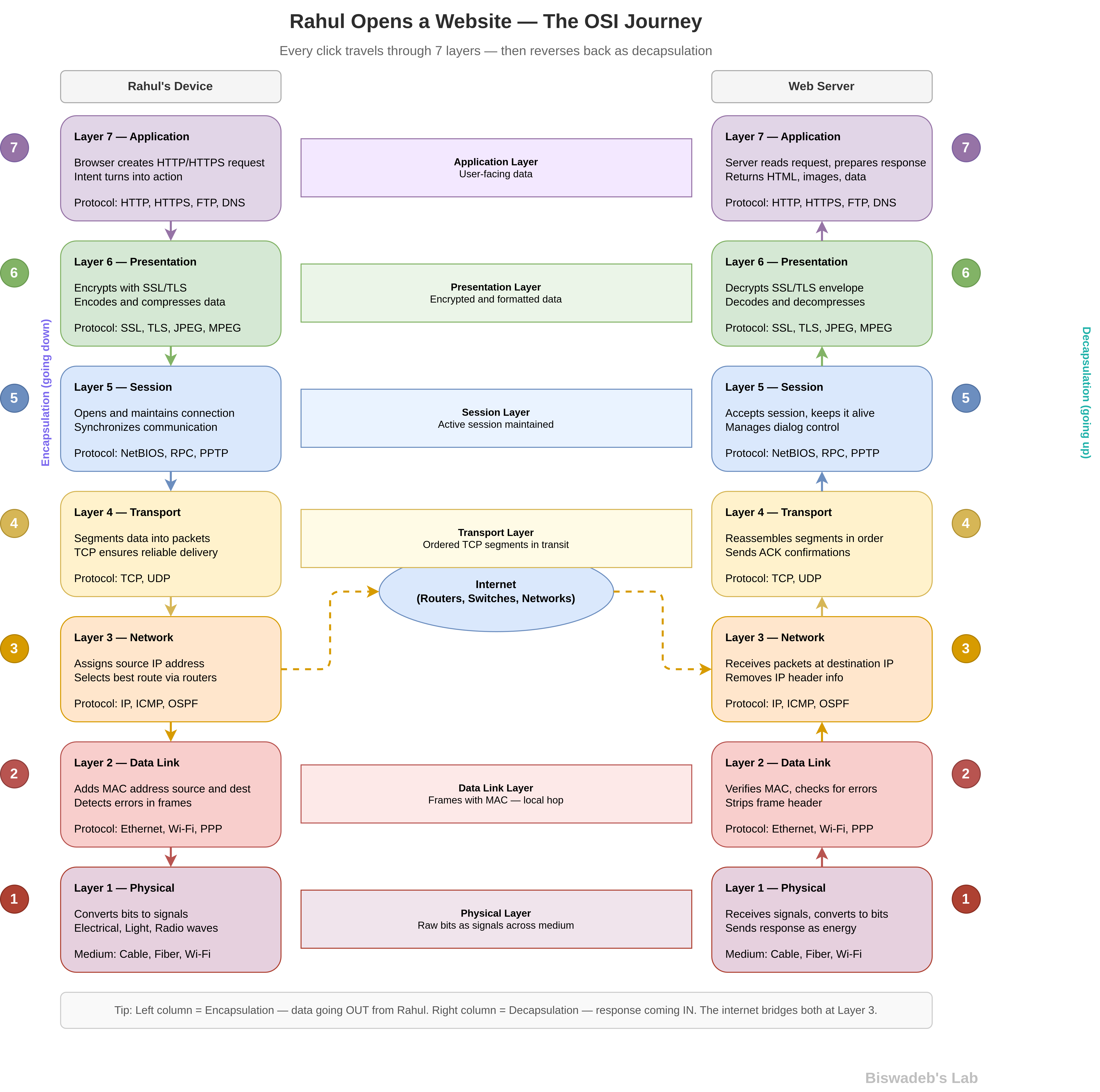
OSI Model — Real World Breakdown: Every security control in this guide — firewalls, IDS/IPS, WAF, VLANs — operates at a specific OSI layer. Understanding this gives you a clearer picture of how traffic is inspected and filtered at each point in the topology.
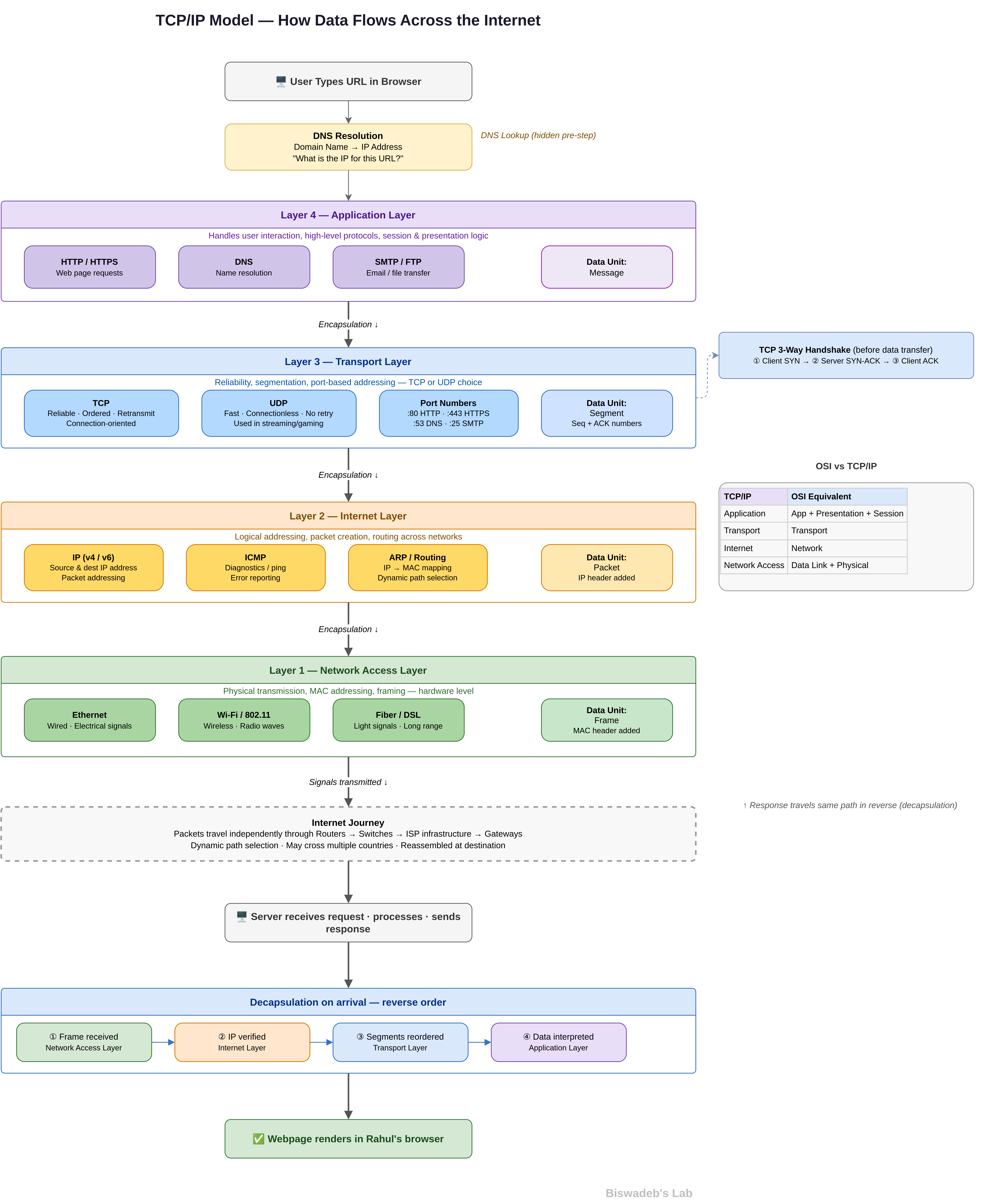
TCP/IP Model — Real World Explained: TCP/IP is what runs beneath every connection in this architecture — from BGP routing at the Edge Router to application traffic passing through the WAF. This article bridges the gap between theory and how packets actually move through a real corporate network.
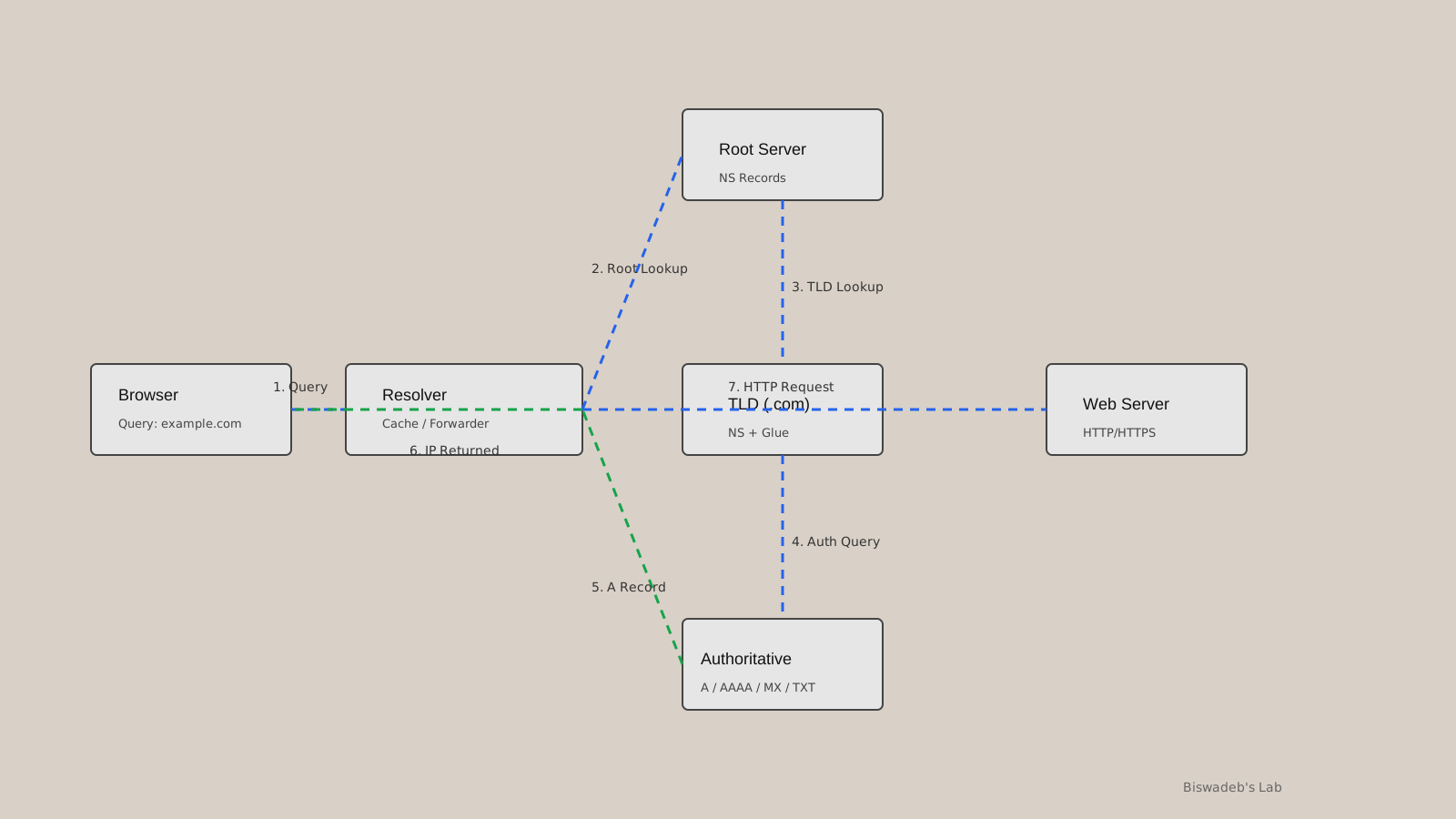
DNS — Why It’s So Special: This topology dedicates two dedicated DNS servers to production and development, respectively. Before understanding why that separation matters, it helps to understand why DNS is so frequently targeted and why getting it wrong is catastrophic.
Unbound DNS Setup: Directly relevant to the DNS Server #1 and DNS Server #2 components in this topology. If you plan to implement the DNS layer of this architecture using a self-hosted resolver, this is the practical guide to start with.
These are not prerequisites — you can follow this guide without them. But readers who understand these foundations will get significantly more out of the architecture decisions explained ahead.
Understanding the Network Topology
This architecture, shown below, is divided into multiple isolated security zones. Each zone has clearly defined responsibilities and communication boundaries.
The architecture includes:
- DMZ / Edge Security Layer
- Internet Edge Infrastructure
- Internal Core Network
- Production Zone (Zone #1)
- Development Zone (Zone #2)
- Secure Laboratory Segment (Lab #1)
- General Laboratory Segment (Lab #2)
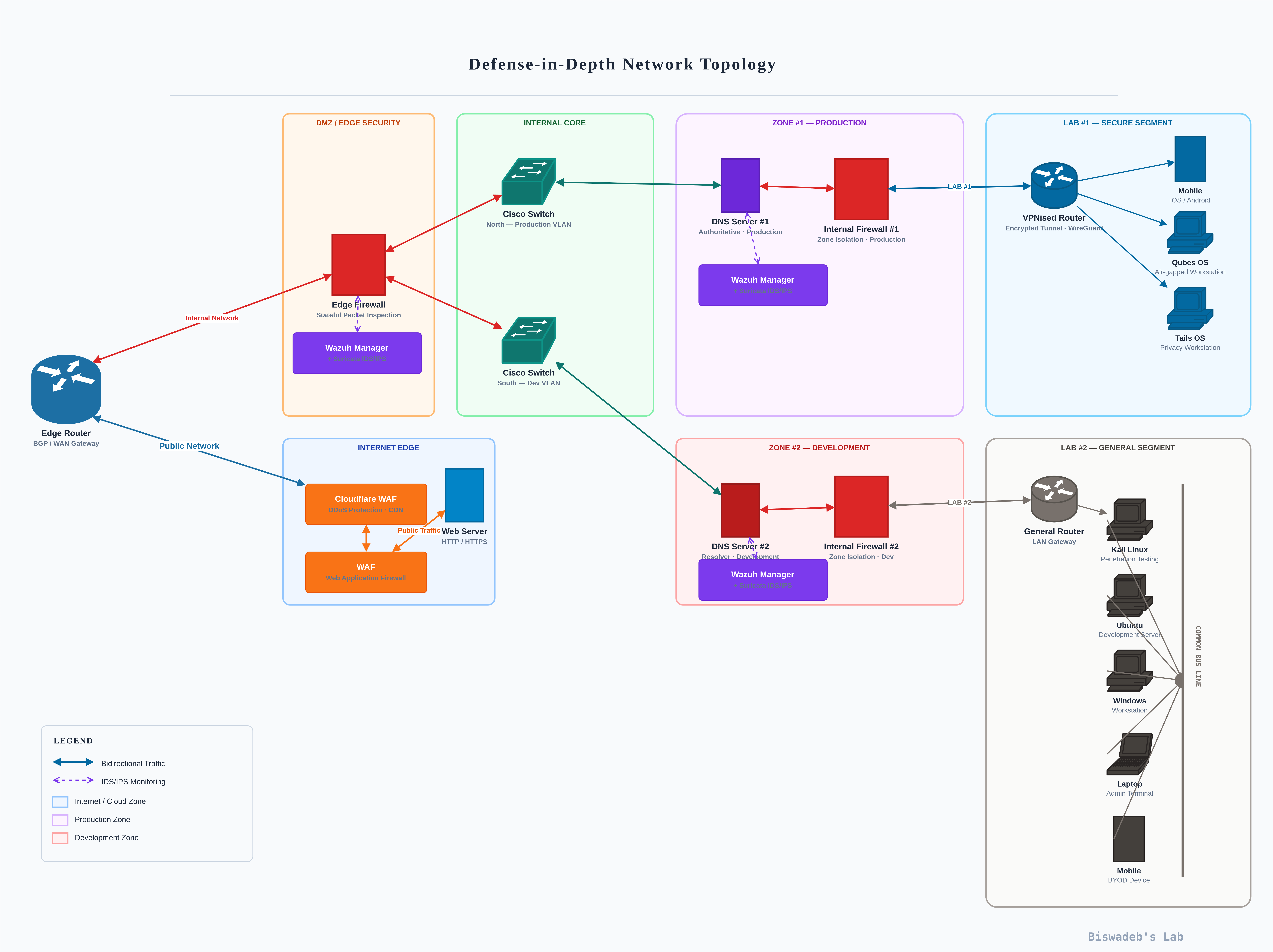
Because each environment is segmented, attackers cannot move freely across the infrastructure after compromising a single system.
The architecture combines VLAN segmentation, firewall isolation, VPN routing, secure DNS separation, threat monitoring, and controlled internet exposure. Consequently, the network becomes significantly more resilient against both external and internal threats.
1. Edge Router — BGP / WAN Gateway
Before traffic reaches any internal security control, it first passes through the Edge Router, which serves as the BGP (Border Gateway Protocol) and WAN gateway for the entire corporate network.
The Edge Router is responsible for:
- Managing external routing via BGP
- Handling WAN connectivity to the public internet
- Directing traffic into the DMZ / Edge Security layer
- Separating the public network from the internal network
This distinction is important. The Edge Router itself does not perform deep packet inspection or security filtering. Instead, it hands traffic to the Edge Firewall for stateful inspection. This separation of routing and security responsibilities is a deliberate architectural choice that improves both performance and clarity of policy enforcement.
2. DMZ / Edge Security Layer
The DMZ (Demilitarised Zone) is the first dedicated security boundary in this architecture. It sits between the public internet and the internal corporate network, filtering, inspecting, and controlling all inbound and outbound traffic.
In the topology, the DMZ / Edge Security layer contains:
- Edge Firewall — performs Stateful Packet Inspection on all traffic crossing the boundary
- Wazuh Manager — monitors security events at the edge and generates alerts for suspicious activity
Purpose of the DMZ
The DMZ minimises direct exposure between public internet traffic and internal corporate systems. Rather than allowing external traffic to reach internal systems directly, the DMZ acts as a controlled buffer zone where traffic is inspected before being permitted inward.
Why Edge Security Matters
Internet-facing systems are among the most targeted assets in any organisation. Without proper protection, attackers may exploit exposed services to gain initial access. Common attack methods include port scanning, credential stuffing, web application exploitation, DDoS attacks, and remote code execution attempts.
Recommended Security Controls
To strengthen edge security, organisations should implement:
- Next-generation firewalls (NGFW)
- Web Application Firewalls (WAF)
- IDS/IPS systems
- Reverse proxies
- Rate limiting
- Geo-blocking policies
- Secure VPN gateways
- Centralised logging
Firewall rules should be reviewed regularly to reduce unnecessary exposure.
3. Internet Edge Infrastructure
The Internet Edge section handles public-facing applications and external connectivity. This zone is separate from the DMZ and is specifically designed to manage web traffic before it reaches backend infrastructure.
In the topology:
- Cloudflare WAF protects web-facing infrastructure with DDoS mitigation and CDN capabilities
- WAF (Web Application Firewall) performs deep inspection of HTTP/HTTPS requests
- Web Server receives only traffic that has passed through both WAF layers
Consequently, malicious requests are blocked before they interact with backend systems.
Importance of Web Application Protection
Modern attackers frequently target web applications because they are directly exposed to the internet. Common attacks include SQL Injection, Cross-Site Scripting (XSS), file upload exploitation, authentication bypass, bot abuse, and API abuse. A properly configured WAF detects and blocks malicious payloads before they reach internal services.
Best Practices for Internet Edge Security
Enforce HTTPS Everywhere — all public-facing applications should use TLS encryption.
Use DDoS Protection Services — platforms like Cloudflare absorb volumetric attacks and hide backend infrastructure IP addresses.
Harden Web Servers — disable unused modules, restrict file uploads, remove default configurations, use secure headers, and apply security patches regularly.
Minimise Internet Exposure — only necessary services should remain internet-accessible.
4. Internal Core Network
The Internal Core acts as the backbone of the enterprise infrastructure, connecting all internal security zones through managed switching and VLAN segmentation.
In the topology:
- Cisco Switch (North — Production VLAN) manages traffic routing toward the Production Zone
- Cisco Switch (South — Dev VLAN) manages traffic routing toward the Development Zone
- Traffic flows through controlled security boundaries between zones
Because of this segmentation, east-west movement becomes significantly more difficult for attackers. The switches enforce VLAN boundaries, ensuring that Production and Development traffic cannot intermingle without passing through appropriate firewall controls.
Why Segmentation Matters
Flat corporate networks are highly dangerous. Once attackers compromise one device, they can often move laterally across the environment with minimal resistance. Segmentation limits attacker mobility and improves containment.
Benefits of VLAN segmentation include limiting lateral movement, separating critical workloads, reducing attack surface, improving traffic visibility, and enabling granular access policies.
Recommended Enterprise VLAN Structure
Secure organisations commonly separate:
- Production systems
- Development infrastructure
- Administrative systems
- Security monitoring tools
- Guest devices
- BYOD systems
- VPN users
- Research environments
Each VLAN should enforce dedicated firewall policies and routing restrictions.
5. Production Zone (Zone #1)
The Production Zone contains mission-critical business infrastructure and therefore requires the highest level of protection in the internal network.
In the topology:
- Internal Firewall #1 isolates the Production VLAN and enforces zone isolation
- DNS Server #1 handles authoritative production DNS resolution
- Wazuh Manager performs centralised security monitoring across production systems
Security Goals for Production Systems
Production environments should prioritise availability, integrity, controlled access, operational stability, and continuous monitoring while minimising operational disruption.
Key Security Measures
Strict Access Control — only authorised personnel should access production systems. Organisations should implement multi-factor authentication, role-based access control, bastion hosts, and VPN-restricted administration.
Secure DNS Architecture — DNS infrastructure is frequently overlooked, yet attackers commonly abuse DNS for persistence, redirection, and command-and-control communication. DNS Server #1 is dedicated exclusively to production and should be protected with DNS logging, DNSSEC, internal DNS segregation, and malicious domain sinkholing.
Continuous Monitoring — Wazuh Manager in this zone monitors login activity, firewall events, endpoint telemetry, unusual network behaviour, and suspicious processes. As a result, organisations can detect attacks faster and reduce dwell time.
6. Development Zone (Zone #2)
Development systems are high-value targets because they often contain source code, API keys, secrets, CI/CD infrastructure, and unpatched applications in testing states.
In the topology:
- Internal Firewall #2 isolates development systems and enforces zone isolation for Dev
- DNS Server #2 handles resolver duties specifically for development infrastructure
- Wazuh Manager provides security monitoring across development systems
- Development traffic remains fully separated from production systems
Why Development Isolation Is Critical
Developers require flexibility for testing and experimentation. However, this flexibility increases security risk. Without isolation, attackers compromising development systems may pivot directly into production infrastructure. Therefore, development and production environments must remain strictly separated at the firewall level.
Secure Development Recommendations
Separate Development and Production Assets — organisations should never share databases, credentials, authentication systems, or API secrets between environments.
Secure the CI/CD Pipeline — implement secret scanning, dependency scanning, signed commits, and artefact verification.
Harden Developer Workstations — developer endpoints should include EDR/XDR solutions, full-disk encryption, least privilege policies, and USB device restrictions.
7. Secure Laboratory Segment (Lab #1)
The Secure Laboratory Segment supports advanced security operations, including malware analysis, threat research, red team testing, and privacy-focused activities.
In the topology:
- VPNised Router routes all lab traffic through an encrypted WireGuard tunnel
- Mobile (iOS/Android) devices connect through the VPN for secure remote access
- Qubes OS serves as an air-gapped workstation for compartmentalised security research
- Tails OS serves as a dedicated privacy workstation for anonymous, trace-free operations
Why Qubes OS and Tails OS?
These are not arbitrary tool choices. Qubes OS provides hardware-level compartmentalisation, allowing researchers to isolate different activities into separate virtual machines that cannot interact. This makes it ideal for handling malicious samples without risking cross-contamination.
Tails OS, designated as the Privacy Workstation in this topology, routes all traffic through Tor and leaves no persistent traces on the host machine. It is specifically suited for threat intelligence gathering, OSINT research, and any operation requiring operational privacy.
Why Secure Research Environments Matter
Security research environments frequently interact with malicious software and suspicious files. They should never directly communicate with production infrastructure. Accidental contamination from an active malware sample could propagate across the network if isolation is not enforced.
Benefits of VPN Isolation
WireGuard-based segmentation provides traffic encryption, route isolation, reduced exposure, operational privacy, and secure remote access for mobile devices connecting to the lab.
Recommended Security Practices
- Use disposable virtual machines for malware analysis and destroy them after investigations
- Disable shared clipboard features to prevent cross-environment data leakage
- Monitor outbound connections, as malware frequently attempts communication with command-and-control servers
- Maintain strict separation between research systems and daily operational infrastructure
8. General Laboratory Segment (Lab #2)
The General Laboratory Segment supports penetration testing, development work, administrative operations, BYOD systems, and security training activities.
In the topology, Lab #2 connects through a General Router (LAN Gateway) and contains:
- Kali Linux — a dedicated penetration testing system
- Ubuntu — development server for general engineering work
- Windows Workstation — enterprise workflow system
- Laptop — admin terminal for laboratory management
- Mobile (BYOD Device) — personal device with network access
All devices in Lab #2 connect through a copper bus line infrastructure managed by the General Router, keeping them logically separated from both production and secure lab environments.
BYOD Security Risks
Bring Your Own Device policies introduce unmanaged endpoints, weak patching discipline, potential malware infections, and unauthorised applications into the network. Therefore, personal devices must never directly access sensitive production systems and should remain confined to the General Lab VLAN.
Recommended Security Controls
Network Access Control (NAC) — verify device compliance before granting network access.
Separate Guest Networks — guest and personal devices should remain isolated from enterprise infrastructure.
Endpoint Monitoring — monitor device posture, patch status, antivirus health, and unauthorised software installations across all Lab #2 endpoints.
9. IDS/IPS Monitoring Across Zones
A distinctive feature of this topology is the IDS/IPS monitoring layer that spans across multiple zones. As shown in the diagram by dashed monitoring lines, intrusion detection and prevention is not confined to a single point but operate across security boundaries.
This means suspicious traffic patterns between zones — for example, unexpected communication between Development and Production — can be detected even if it passes through firewall rules that technically permit the connection.
Combined with Wazuh Managers deployed in the DMZ, Production, and Development zones, the monitoring coverage in this architecture is comprehensive. Security teams gain visibility at:
- The edge (DMZ Wazuh Manager)
- The production environment (Zone #1 Wazuh Manager)
- The development environment (Zone #2 Wazuh Manager)
10. Centralised Monitoring with Wazuh
A secure corporate network without monitoring is essentially blind. In this topology, Wazuh managers provide centralised visibility across multiple security zones, each independently collecting and analysing security telemetry from their respective environments.
What Should Be Monitored?
Authentication Events — failed login attempts, privilege escalation, and new account creation.
Network Activity — port scanning, lateral movement attempts, abnormal traffic patterns.
Endpoint Behaviour — suspicious processes, persistence mechanisms, registry modifications.
Firewall Activity — blocked connections, policy violations, unexpected outbound traffic.
SIEM and Threat Detection
Modern enterprises increasingly rely on SIEM platforms, threat intelligence feeds, behavioural analytics, and automated alerting. While prevention remains important, rapid detection is equally critical for limiting breach impact.
Zero Trust Principles in This Architecture
Modern enterprise security increasingly follows a Zero Trust model, built on a simple concept: never trust, always verify.
Unlike traditional networks, Zero Trust assumes that no user, device, or network segment should automatically be trusted, regardless of whether they are inside or outside the corporate perimeter.
Core Zero Trust components include:
- Identity Verification — every user and device must be authenticated continuously
- Least Privilege Access — users should only access resources necessary for their role
- Continuous Validation — sessions should be monitored continuously rather than relying solely on initial authentication
- Micro-Segmentation — networks should be divided into smaller trust zones
Because this topology already uses layered segmentation, dedicated internal firewalls per zone, VPN-based lab isolation, and continuous Wazuh monitoring across environments, it aligns closely with Zero Trust principles in practice.
The Insider Threat Problem — Why Even a Hardened Network Can Fail
Every control discussed in this guide — firewalls, VLAN segmentation, DMZ isolation, VPN tunnels, IDS/IPS monitoring — is designed to stop an attacker coming from outside the network.
But what happens when the threat is already inside?
An insider threat is not a hypothetical edge case. It is one of the most consistently dangerous and consistently underestimated risks in enterprise security. A disgruntled employee, a bribed staff member, a contractor with temporary access, or simply a careless user with overly broad permissions can cause damage that no perimeter defence can prevent — because they are already authenticated, already trusted, and already inside the security boundary.
Consider a realistic scenario: an employee with legitimate access to the production environment is bribed by an external party. They walk into the server room, plug a USB drive into a production machine, and execute a payload. At that moment, every firewall rule, every VLAN boundary, every IDS signature watching for external intrusion becomes irrelevant. The attacker is already inside, operating under valid credentials, on a trusted machine, in a trusted zone.
This is why Zero Trust says never trust, always verify — including your own people.
Types of Insider Threats
Malicious Insiders — employees or contractors who intentionally abuse their access for financial gain, sabotage, espionage, or personal grievance. This includes bribed staff, planted employees, and individuals exfiltrating sensitive data to competitors.
Negligent Insiders — users who do not intend harm but create serious risk through careless behaviour. Clicking phishing links, using weak passwords, connecting personal devices to production networks, or misconfiguring systems fall into this category.
Compromised Insiders — legitimate users whose credentials or devices have been stolen or compromised by an external attacker. The network sees the activity as legitimate because the credentials are genuine.
Physical Access — The Most Overlooked Attack Vector
Network security guides almost universally focus on logical controls while ignoring physical access. This is a critical blind spot.
A USB device inserted directly into a production server bypasses every network-level control without exception. There is no firewall rule, no IDS signature, and no VLAN policy that can intercept a payload delivered physically. The same applies to an attacker who gains physical access to networking equipment and patches into a trusted VLAN directly.
Physical security controls that organisations must enforce include:
- USB port restrictions — disable USB storage on all production and sensitive systems at the OS and BIOS level. Wazuh can alert on USB device connection events as an additional detection layer
- Locked server rooms and racks — physical access to servers, switches, and firewalls must be restricted, logged, and monitored with access control systems
- CCTV coverage of critical infrastructure — server rooms, network closets, and data centre floors should have continuous surveillance
- Visitor and contractor access logs — all third-party access to physical infrastructure must be logged with timestamps, and supervising staff must be recorded
- Tamper-evident seals on critical hardware to detect unauthorised physical interference
- Clean desk policies — sensitive credentials, network diagrams, and access cards must never be left unattended
Behavioural Indicators Before an Attack Happens
Insider threats rarely emerge without warning signs. Security teams and managers trained to recognise behavioural indicators can often detect risk before damage occurs.
Common pre-attack behavioural signals include:
- Accessing systems or data outside of normal working hours without explanation
- Downloading or copying unusually large volumes of data
- Attempting to access resources beyond their role or clearance level
- Requesting elevated permissions without a clear business justification
- Expressing significant dissatisfaction, financial stress, or grievances toward the organisation
- Connecting unauthorised personal devices to internal networks
- Disabling or tampering with endpoint security software
None of these signals alone confirms malicious intent. However, security teams should treat patterns of these behaviours as triggers for closer review.
How This Topology Detects Insider Threats
The architecture in this guide includes several controls that, when properly configured, provide meaningful insider threat detection capability.
Wazuh across all zones — Wazuh Managers deployed in the DMZ, Production Zone, and Development Zone monitor authentication events, privilege escalation attempts, unusual file access patterns, and process execution. An employee accessing production systems at 2am or running an unfamiliar executable on a production server will generate alerts.
VLAN segmentation and internal firewalls — even authenticated insiders are restricted to the zones their role requires. A developer cannot reach production systems without passing through Internal Firewall #1, which enforces strict zone isolation. Lateral movement by an insider is therefore limited and logged.
IDS/IPS monitoring lines — as shown in the topology, IDS/IPS monitoring operates across zone boundaries. Unusual traffic patterns originating from an internal trusted source — such as a production workstation suddenly attempting to communicate with the development zone or an external IP — are flagged regardless of whether the source is a legitimate user.
DNS logging — DNS Server #1 and DNS Server #2 log all resolution requests. Malware delivered via USB frequently attempts DNS-based command-and-control communication. Anomalous DNS queries from production systems can reveal a compromise even when the initial delivery was physical.
USB connection alerting — Wazuh can be configured to generate alerts on USB storage device connection events at the endpoint level, providing a detection layer even when physical prevention has failed.
Organisational Controls That Technology Cannot Replace
Technical controls alone cannot solve the insider threat problem. Organisational discipline is equally critical.
Least privilege, enforced strictly — every user, service account, and application should have access only to what their role explicitly requires. Access should be reviewed and revoked promptly when roles change or employment ends.
Immediate access revocation on departure — when an employee leaves the organisation, all accounts, VPN credentials, API keys, and physical access must be revoked on the same day. Delayed revocation is one of the most common and preventable insider risk factors.
Separation of duties — no single individual should have unchecked control over critical systems. Production deployments, firewall rule changes, and administrative account creation should require approval from a second party.
Regular access audits — periodically review who has access to what. Permissions accumulate over time as roles evolve, leaving users with access they no longer need and should not retain.
Security awareness training — employees who understand social engineering, phishing, and the consequences of insider incidents are significantly less likely to become negligent or compromised insiders.
Incident response planning for insider scenarios — organisations must have a documented response plan specifically for insider threat incidents, including who is notified, how systems are isolated, and how evidence is preserved for potential legal action.
The Uncomfortable Truth
No technical architecture, regardless of how well designed, can fully eliminate insider threat risk. A sufficiently determined insider with physical access and legitimate credentials will always have opportunities that external attackers do not.
What a well-designed architecture does is dramatically raise the cost and detectability of insider attacks. Zone isolation means a malicious insider cannot freely access every system. Continuous monitoring means their actions leave a trail. Least privilege means the damage they can cause is bounded by the access they have.
The goal is not to make insider attacks impossible. It is to make them difficult to execute silently, easy to detect quickly, and limited in the damage they can cause before intervention.
Common Mistakes When Building a Secure Corporate Network
Even mature organisations make avoidable security mistakes. Understanding these weaknesses helps reduce unnecessary exposure.
Flat Network Architecture — flat networks allow attackers to move freely after compromising one device. Zone segmentation directly addresses this.
Weak Firewall Policies — overly permissive rules dramatically increase the attack surface. Each firewall in this topology enforces strict zone isolation policies.
Ignoring the DMZ — many smaller organisations skip the DMZ entirely, exposing internal systems to direct internet traffic. This topology treats the DMZ as a non-negotiable security boundary.
Ignoring Internal Threats — many businesses focus only on external attackers while overlooking insider risk. Wazuh monitoring inside each zone addresses internal threat visibility.
Lack of Monitoring — without visibility, attackers may remain undetected for months. Multi-zone Wazuh deployment eliminates monitoring blind spots.
Shared Credentials — credential reuse across production and development environments increases compromise risk significantly.
Poor Patch Management — unpatched systems remain one of the easiest attack vectors, particularly in development and lab environments.
Recommended Technologies for Enterprise Security
| Security Layer | Recommended Technology |
|---|---|
| WAN / Routing | BGP-capable Edge Router |
| Edge Protection | NGFW, Stateful Firewall, IDS/IPS |
| Web Protection | WAF, CDN (Cloudflare) |
| VPN Security | WireGuard, IPsec |
| Monitoring | Wazuh, ELK, SIEM |
| Endpoint Security | EDR/XDR |
| DNS Security | DNSSEC, Sinkholing |
| Access Control | MFA, RBAC |
| Segmentation | VLANs, Internal Firewalls |
| Research OS | Qubes OS, Tails OS |
| Penetration Testing | Kali Linux |
| Threat Intelligence | IOC Feeds, Threat Hunting |
Although technology is important, proper configuration and operational discipline matter even more.
A Note on Budget Implementation
This topology is designed to demonstrate a comprehensive, enterprise-grade defence-in-depth architecture. In practice, particularly for startups and growing businesses, not every component shown will be immediately feasible to deploy at full scale.
Certain advanced features — such as dedicated hardware firewalls for every zone, commercial NGFW licensing, full EDR/XDR coverage across all endpoints, or redundant DNS infrastructure — have been represented here in their ideal form. A budget-conscious implementation may phase these in over time or substitute open-source and community-supported alternatives where appropriate.
This does not mean a budget implementation is an insecure one.
Security is not determined by how much is spent. It is determined by how thoughtfully the available controls are configured, maintained, and monitored. An organisation running pfSense instead of a commercial NGFW, or deploying Wazuh on modest hardware, with properly enforced VLAN segmentation and disciplined access control, is significantly more secure than an organisation with enterprise-grade hardware that is poorly configured and left unmonitored.
The architecture principles in this guide — zone isolation, layered defence, least privilege, and continuous monitoring — cost nothing to apply correctly. The tools to implement them, many of which are used in this topology, are open-source and freely available.
The goal of this guide is to show what a mature architecture looks like, so that even organisations building incrementally know exactly what they are working toward and why each layer matters.
Single Points of Failure and High Availability Considerations
There is an architectural truth that this topology, like most honest enterprise diagrams, does not hide: several components in this design are single points of failure. If any one of them goes down — whether through hardware failure, software crash, misconfiguration, or a targeted attack — the zone or environment it serves goes with it.
This is not a flaw unique to this design. It is a reality that every organisation must acknowledge, plan around, and mitigate according to their operational priorities and available budget. Ignoring it does not make it go away. Understanding it allows organisations to build resilience deliberately.
Where the Single Points of Failure Are
Edge Router (BGP / WAN Gateway)
This is the most critical single point of failure in the entire architecture. The Edge Router is the sole gateway between the corporate network and the public internet. If it fails, the entire organisation loses external connectivity simultaneously — no internet access, no cloud services, no remote access, no external communications. Every zone is affected regardless of how well each internal segment is designed.
Mitigation: Deploy a secondary Edge Router in an active-passive or active-active configuration with BGP failover. Many organisations also maintain a secondary ISP connection on a separate physical line so that WAN redundancy exists even if the primary carrier experiences an outage.
Edge Firewall (DMZ / Edge Security)
The Edge Firewall performs stateful packet inspection on all traffic entering or leaving the corporate network. A failure here does not just cause an outage — depending on how it fails, it may either drop all traffic (causing a blackout) or fail open (exposing the internal network directly to the internet, which is the more dangerous outcome).
Mitigation: Deploy firewalls in a high-availability pair with stateful session synchronisation so that if the primary unit fails, the secondary takes over without dropping active connections. This is standard practice for production environments where downtime has direct business impact.
Cisco Switch North — Production VLAN
The North-facing Cisco Switch manages all traffic routing into and out of the Production Zone. If this switch fails, the entire Production VLAN loses connectivity. Production systems, DNS Server #1, Internal Firewall #1, and Wazuh Manager in Zone #1 all become unreachable from the internal core.
Mitigation: Deploy a secondary switch in a stacked or redundant configuration. Use link aggregation (LACP) between switches and uplinks to eliminate single cable or port failures as a cause of outage.
Cisco Switch South — Development VLAN
Identical risk profile to the North switch, scoped to the Development Zone. A failure here isolates Zone #2 entirely — DNS Server #2, Internal Firewall #2, Wazuh Manager, and all development infrastructure go offline.
Mitigation: Same redundant switch pairing approach as the Production VLAN switch.
Internal Firewall #1 — Production Zone
Internal Firewall #1 enforces zone isolation for the entire Production environment. It is the only path through which production traffic is permitted or denied. A failure here makes the Production Zone completely inaccessible from the internal core, regardless of whether the zone’s systems themselves are functioning.
Mitigation: High-availability firewall pairing with session synchronisation, identical to the recommendation for the Edge Firewall. Production environments should treat firewall redundancy as non-negotiable.
Internal Firewall #2 — Development Zone
Same failure profile as Internal Firewall #1, scoped to the Development Zone. Development teams lose all network access to their environment if this firewall goes down.
Mitigation: HA firewall pairing. Development environments may tolerate more downtime than production, but the risk of a firewall failing open and exposing development systems to other internal zones makes redundancy important here too.
VPNised Router — Secure Lab Segment (Lab #1)
The VPNised Router manages WireGuard tunnel termination and all routing for the Secure Laboratory Segment. If this router fails, Lab #1 loses all connectivity — Qubes OS, Tails OS, and any mobile devices relying on the VPN tunnel are completely isolated.
Mitigation: For security research environments, a brief outage is typically tolerable. Maintain a documented manual recovery procedure and keep a spare router pre-configured with the WireGuard keys and routing table so recovery time is minimised.
General Router — Lab #2 (LAN Gateway)
The General Router serves as the LAN gateway for the entire General Laboratory Segment. A failure here takes down all Lab #2 connectivity — Kali Linux, Ubuntu, Windows workstations, the admin laptop, and BYOD devices all lose network access simultaneously.
Mitigation: Similar to the VPN router — a spare pre-configured unit with documented recovery steps is the most cost-effective approach for a general lab environment.
DNS Server #1 — Production
DNS failure is uniquely dangerous because it does not always present as an obvious outage. When DNS Server #1 goes down, production services do not immediately stop — but they begin failing silently and unpredictably as DNS caches expire. Users and systems start receiving resolution failures, services that depend on internal name resolution begin timing out, and the resulting errors can be difficult to diagnose quickly under pressure.
Mitigation: Deploy a secondary authoritative DNS server for the production zone. DNS redundancy is one of the highest-value, lowest-cost resilience investments an organisation can make. Both servers should serve identical zone data, with automated synchronisation to prevent configuration drift.
DNS Server #2 — Development
Same failure profile as DNS Server #1, scoped to the development environment. Development pipelines, CI/CD systems, and internal tooling that depend on name resolution will begin failing as caches expire.
Mitigation: Secondary DNS resolver for the development zone, synchronised with the primary.
Wazuh Manager — Any Zone
A Wazuh Manager failure does not cause an operational outage — systems continue running. However, it creates something potentially more dangerous: a monitoring blind spot. If the Wazuh Manager in the Production Zone goes down, security events in that zone stop being collected, analysed, and alerted on. An attacker — or an insider — operating in that zone during the outage period does so completely unobserved.
Mitigation: Configure Wazuh agents to buffer events locally when the manager is unreachable, so that events are not lost — only delayed. Deploy Wazuh in a clustered configuration for production environments where continuous monitoring is a compliance or operational requirement. At minimum, alert on Wazuh Manager unavailability itself so the blind spot is known immediately.
Prioritising Redundancy on a Budget
Not every organisation can afford to redundancy every component simultaneously. If resources are limited, prioritise in this order:
Priority 1 — Edge Router and WAN connectivity. A total internet outage affects every person and every system in the organisation. This has the broadest operational impact and should be addressed first, even with a simple secondary ISP connection on a consumer-grade failover router as an interim measure.
Priority 2 — Edge Firewall. A firewall that fails open is a security catastrophe. Even a modest HA pair running pfSense or OPNsense is vastly preferable to a single commercial unit with no failover.
Priority 3 — Production Zone DNS. Silent DNS failures in production are among the most disruptive and hardest-to-diagnose outages. A secondary DNS server is inexpensive and high-impact.
Priority 4 — Production Zone Firewall and Switch. Production environments directly impact business operations and revenue. Redundancy here protects the systems that matter most.
Priority 5 — Wazuh monitoring continuity. Monitoring blind spots during incidents are when the most damage is done. Ensure Wazuh agents buffer locally and that manager unavailability generates an immediate alert.
Development, lab, and research environments can tolerate higher downtime and are lower priority for redundancy investment. Document recovery procedures for these environments so that when failures occur, restoration is fast even without automated failover.
The Broader Point
A network that is highly secure but not resilient is one that can be taken down by a power fluctuation, a failed capacitor, or an ISP maintenance window. Availability is itself a security property — denial of service does not always come from an attacker. Sometimes it comes from a hardware failure at the worst possible moment.
Building resilience into the architecture from the start, even incrementally, is what separates a network that survives real-world conditions from one that only works in ideal ones.
Frequently Asked Questions (FAQ)
1. What is a secure corporate network?
A secure corporate network protects enterprise systems, applications, users, and sensitive business data using layered security controls such as segmentation, monitoring, VPNs, firewalls, and access management.
2. Why is segmentation important in enterprise security?
Segmentation reduces lateral movement opportunities. Attackers cannot easily move across the environment after compromising a single system because each zone is isolated behind its own firewall.
3. Does this topology include a DMZ?
Yes. This topology includes a dedicated DMZ / Edge Security zone that sits between the public internet and the internal corporate network. The DMZ contains the Edge Firewall and a Wazuh Manager, forming the first security boundary all external traffic must pass through.
4. Why are production and development environments separated?
Development systems often contain testing tools, experimental software, and less restrictive configurations. Separation prevents development-related compromises from impacting production systems. Each zone has its own internal firewall and dedicated DNS server.
5. Why is WireGuard used for VPN isolation in Lab #1?
WireGuard encrypts all traffic leaving the Secure Lab segment, provides route isolation, and supports secure mobile device connectivity. It is lightweight, auditable, and well-suited for high-security research environments.
6. What is the role of Wazuh in this topology?
Wazuh provides centralised monitoring, log analysis, alerting, and threat visibility. Three separate Wazuh Manager instances are deployed across the DMZ, Production Zone, and Development Zone to ensure comprehensive coverage.
7. What is the purpose of Tails OS in Lab #1?
Tails OS is designated as the Privacy Workstation in the Secure Lab segment. It routes all activity through Tor, leaves no persistent traces on the host machine, and is used for privacy-sensitive research, OSINT operations, and threat intelligence gathering.
8. What is Qubes OS used for?
Qubes OS is the air-gapped workstation in Lab #1. It provides hardware-level compartmentalisation through isolated virtual machines, making it ideal for safely handling malware samples and conducting compartmentalised security research.
9. What is the Edge Router’s role?
The Edge Router serves as the BGP and WAN gateway for the entire network. It manages external routing and WAN connectivity before passing traffic to the Edge Firewall for stateful inspection and security enforcement.
10. How can businesses secure public-facing web applications?
Organisations should implement Web Application Firewalls, HTTPS encryption, DDoS protection, secure server hardening, and continuous monitoring. Additionally, businesses should minimise unnecessary internet exposure by restricting access to only essential services.
11. How often should organisations perform security assessments?
Organisations should conduct continuous monitoring daily, vulnerability scans regularly, penetration testing annually, and security reviews after major infrastructure changes.
Conclusion
Building a secure corporate network requires far more than deploying a firewall and antivirus solution. Modern enterprise security depends on layered defence, segmentation, monitoring, controlled trust boundaries, and continuous visibility across every zone.
The topology shown in this guide demonstrates a practical defence-in-depth architecture by combining:
- BGP/WAN edge routing
- DMZ with stateful packet inspection
- Dual-layer web application protection
- VLAN segmentation via managed Cisco switching
- Internal firewall isolation per security zone
- Dedicated DNS infrastructure for production and development
- WireGuard VPN isolation for the secure lab segment
- Qubes OS and Tails OS for compartmentalised and privacy-focused research
- Kali Linux and BYOD management in the general lab segment
- Multi-zone Wazuh monitoring with IDS/IPS coverage
Although no network can ever be completely secure, organisations can drastically reduce risk through proper architecture, segmentation, and operational discipline. The objective is to reduce attack surface, slow adversaries, detect intrusions quickly, and contain breaches before they escalate into catastrophic incidents.
As cyber threats continue evolving, businesses must evolve faster. A properly designed secure corporate network is not just infrastructure. It is the foundation of operational resilience, business continuity, and long-term digital survival.
Ready to Build This for Your Organisation?
Designing and implementing a defence-in-depth network like the one covered in this guide takes expertise, careful planning, and hands-on experience across firewalls, VLANs, DNS architecture, VPN routing, and security monitoring.
If you are a startup, SMB, or corporate team that wants to implement this architecture — or a customised version of it — without spending months figuring it out alone, I can help.
What I offer:
- Network security architecture design tailored to your organisation’s size and threat model
- Firewall configuration, VLAN segmentation, and zone isolation setup
- Wazuh SIEM deployment and monitoring configuration
- WireGuard VPN setup for secure remote access and lab isolation
- Security assessment of your existing infrastructure
Whether you are starting from scratch or hardening an existing network, get in touch, and we can discuss what your organisation needs.
Email me directly: [email protected]
I respond to all serious enquiries within 48 to 72 hours.
References
- National Institute of Standards and Technology (NIST) – Cybersecurity Framework: https://www.nist.gov/cyberframework
- NIST SP 800-41 – Guidelines on Firewalls and Firewall Policy: https://csrc.nist.gov/publications/detail/sp/800-41/rev-1/final
- NIST SP 800-207 – Zero Trust Architecture: https://csrc.nist.gov/publications/detail/sp/800-207/final
- OWASP Web Security Testing Guide: https://owasp.org/www-project-web-security-testing-guide/
- OWASP Top 10 Web Application Security Risks: https://owasp.org/www-project-top-ten/
- Cisco Enterprise Network Design Best Practices: https://www.cisco.com/c/en/us/solutions/enterprise-networks/index.html
- Cloudflare Learning Center – DDoS and WAF Security: https://www.cloudflare.com/learning/
- MITRE ATT&CK Framework: https://attack.mitre.org/
- Wazuh Security Monitoring Documentation: https://documentation.wazuh.com/
- SANS Institute – Network Segmentation Best Practices: https://www.sans.org/white-papers/
- Center for Internet Security (CIS) Controls v8: https://www.cisecurity.org/controls/v8
- WireGuard VPN Documentation: https://www.wireguard.com/
- Palo Alto Networks – Defense in Depth Strategy: https://www.paloaltonetworks.com/cyberpedia/what-is-defense-in-depth
- Microsoft Security – Zero Trust Deployment Guide: https://learn.microsoft.com/en-us/security/zero-trust/
- IBM X-Force Threat Intelligence Reports: https://www.ibm.com/reports/threat-intelligence
- ENISA Threat Landscape Reports: https://www.enisa.europa.eu/topics/threat-risk-management/threats-and-trends
- CISA Network Security Best Practices: https://www.cisa.gov/topics/cybersecurity-best-practices
- RFC 1918 – Address Allocation for Private Internets: https://datatracker.ietf.org/doc/html/rfc1918
- RFC 2827 – Network Ingress Filtering: https://datatracker.ietf.org/doc/html/rfc2827
- ISO/IEC 27001 Information Security Standards: https://www.iso.org/isoiec-27001-information-security.html




Leave a Reply