
DNS?? Why It’s So Special
The internet feels instant. You type a website name, hit enter, and within seconds the page appears. Behind that smooth experience lies a system that quietly handles billions of requests every day. DNS short form of the name Domain Name System.
Although most users never think about it, but it is one of the core technologies that keeps the internet usable, scalable, and reliable. Without it, browsing would feel more like memorizing phone numbers than navigating a global network.
What is DNS?
At its core, it is a system that translates human-friendly domain names into machine-readable IP addresses. While people prefer names like example.com, computers communicate using numerical identifiers such as 192.168.1.1.
In simple terms, it acts as a translator between humans and machines.
To make this clearer, imagine trying to call someone without a contact list. You would need to remember every phone number manually. It removes that burden by mapping easy-to-remember names to complex numerical addresses.
As a result, users can focus on navigation instead of memorization.
Why the Internet Depends on DNS
The internet relies heavily on DNS because it simplifies how users interact with networks. Without this system, accessing websites would become impractical.
- First, it makes navigation intuitive. Instead of recalling long strings of numbers, users only need to remember domain names.
- In addition, it enables scalability. Since millions of websites exist today, a structured naming system allows the internet to grow without becoming chaotic.
- Moreover, it supports load balancing. A single domain can point to multiple servers, distributing traffic efficiently. This helps websites handle large volumes of users without slowing down.
- Another important factor is reliability. When one server fails, it can redirect traffic to another server. Consequently, services remain available even during outages.
- Furthermore, it plays a role in email delivery. Mail servers rely on dns records to route messages correctly across the internet.
Taken together, these capabilities make it a foundational component of modern networking.
How DNS Works (Step-by-Step)
Understanding the workflow behind DNS helps clarify its importance. The process involves several layers working together seamlessly.
The diagram below shows how DNS resolves a domain step by step:
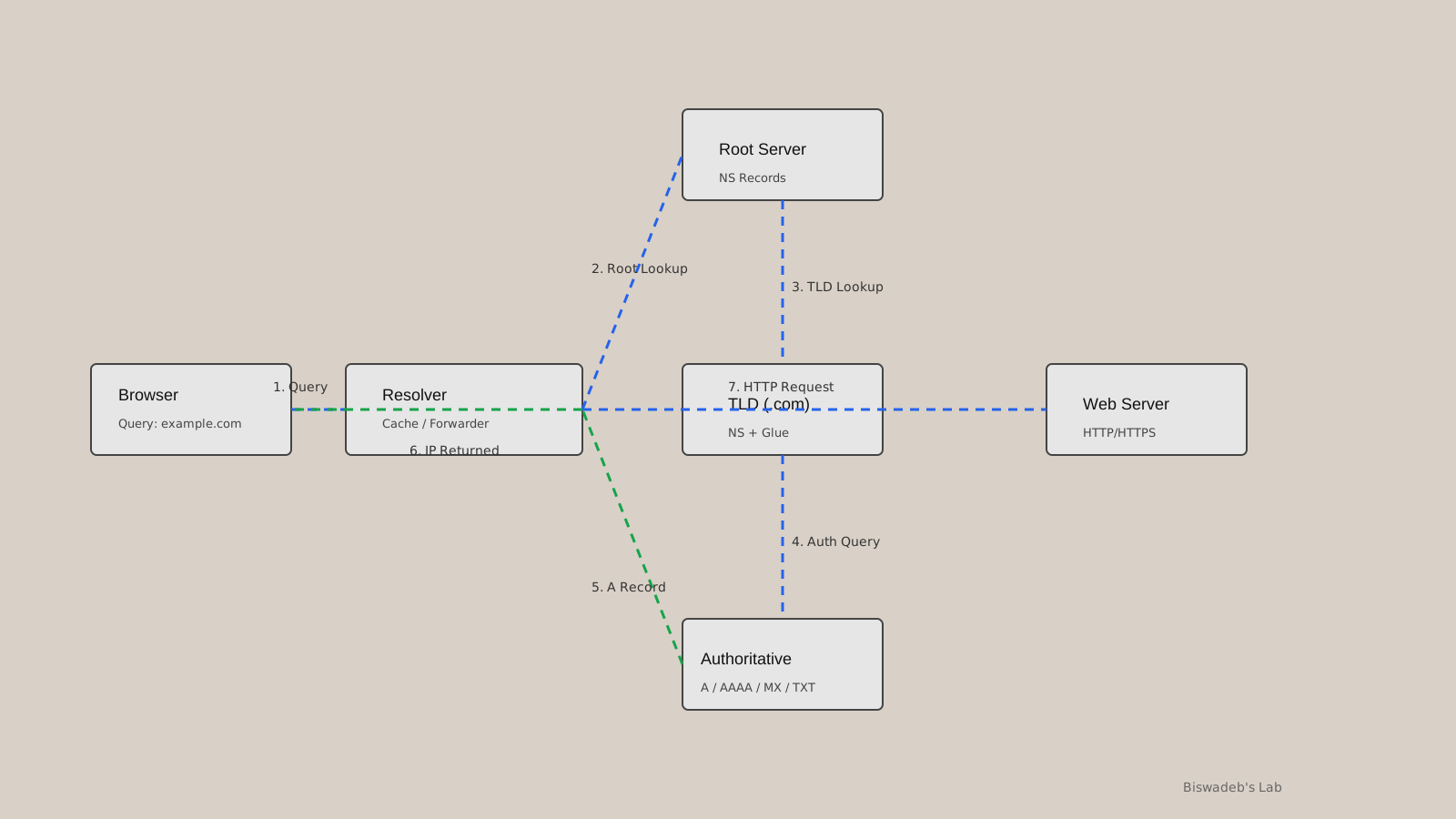
Here’s how the process unfolds:
Step 1: User Request
When a user enters a domain name into a browser, a request is generated.
Step 2: Recursive Resolver
Next, the request is sent to a DNS resolver. This resolver checks whether it already has the answer stored in its cache.
Step 3: Root Server
If no cached data exists, the resolver contacts a root server. Although root servers do not provide the final answer, they guide the query to the correct direction.
Step 4: TLD Server
After that, the resolver queries a Top-Level Domain server, such as .com or .org.
Step 5: Authoritative Server
Then, the request reaches the authoritative server. This server contains the actual DNS records for the domain.
Step 6: Response
Once the correct IP address is found, it is sent back to the resolver and then to the user’s device.
Step 7: Connection
Finally, the browser uses the IP address to establish a connection with the target server.
Because of caching, repeated requests become significantly faster over time.
Components of DNS
DNS is not a single entity. Instead, it is a collection of components that work together.
Domain Names
These are human-readable identifiers used to access resources online.
DNS Records
These records store essential mapping information.
Common record types include:
- A Record → Maps a domain to an IPv4 address
- AAAA Record → Maps a domain to an IPv6 address
- CNAME Record → Redirects one domain to another
- MX Record → Handles email routing
- TXT Record → Stores verification or metadata
DNS Resolver
This component acts as the intermediary between the user and the DNS infrastructure.
Root Servers
These servers sit at the top of the hierarchy and direct queries appropriately.
TLD Servers
They manage domain extensions like .com, .net, and .org.
Authoritative Servers
These servers hold the final answers for domain queries.
Each component plays a distinct role, ensuring that the system remains efficient and organized.
DNS Caching: Speed and Efficiency
One of the reasons DNS feels fast is caching.
Whenever a domain is resolved, the result is temporarily stored. This happens at multiple levels, including the browser, operating system, and resolver.
Because of caching, repeated lookups do not require a full resolution process. Instead, the stored result is reused, reducing latency.
However, caching also introduces delays when updates occur. Changes to it’s records may take time to propagate globally.
Security in DNS
Originally, it was not designed with strong security in mind. As a result, it has become a target for various types of attacks.
Common Threats
- DNS spoofing
- Cache poisoning
- Amplification attacks
- Data exfiltration
To address these issues, DNSSEC (DNS Security Extensions) was introduced. This adds cryptographic verification to DNS responses, ensuring that the data has not been tampered with.
Consequently, it is evolving into a more secure and trustworthy system.
Powerful DNS Software
Several software solutions power it’s infrastructure across the internet. Each has its own strengths and use cases.
BIND (Berkeley Internet Name Domain)
One of the oldest DNS servers still in use, BIND offers flexibility and extensive configuration options. It is widely used in enterprise environments.
PowerDNS
This modern DNS server supports database-backed storage and provides APIs for automation. It is well-suited for scalable deployments.
Knot DNS
Designed for performance, Knot DNS is lightweight and efficient. It is often used in high-speed environments.
NSD
NSD focuses on authoritative DNS services. It is simple, reliable, and widely used by large organizations.
Unbound
Unbound is a recursive resolver known for its emphasis on privacy and security. It supports DNSSEC validation and is easy to deploy.
Recommended DNS Software (Based on Use Case)
Choosing the right DNS software depends on your requirements.
For Beginners or Small Setups
Unbound is a strong choice due to its simplicity. BIND is also suitable because of its extensive documentation.
For High Performance
Knot DNS and NSD provide excellent speed and efficiency with minimal overhead.
For Enterprise Environments
PowerDNS stands out due to its scalability and API support. BIND remains a reliable option as well.
For Security-Focused Deployments
Unbound offers strong security features, while PowerDNS provides advanced monitoring and control.
Selecting the right tool ensures better performance, reliability, and security.
DNS in Modern Infrastructure
Today, it does much more than resolve domain names.
In cloud environments, it directs traffic across multiple regions. This improves both performance and availability.
Similarly, content delivery networks rely on DNS to route users to the nearest server. As a result, content loads faster.
In microservices architectures, it enables service discovery. Different components can locate each other dynamically without hardcoding addresses.
Additionally, it is increasingly used in security strategies. It helps monitor traffic patterns and enforce access policies.
Why DNS Is Truly Special
Several characteristics make DNS unique.
First, it operates quietly in the background. Most users never notice it, yet every online interaction depends on it.
Second, it is globally distributed. Servers around the world work together to provide fast and reliable responses.
Third, it is resilient. Even if parts of the system fail, it continues to function.
Finally, it is adaptable. Over time, it has evolved to support modern needs such as cloud computing, security, and large-scale traffic management.
Conclusion
DNS is one of the most critical systems on the internet. While it may not be visible to users, its impact is enormous.
By translating domain names, enabling scalability, and supporting modern infrastructure, it forms the backbone of online communication.
Understanding how it works provides valuable insight into the inner workings of the internet. Whether you are a developer, security professional, or curious learner, DNS is a topic worth mastering.
References
- Internet Engineering Task Force
RFC 1034 – Domain Names: Concepts and Facilities
https://datatracker.ietf.org/doc/html/rfc1034 - Internet Engineering Task Force
RFC 1035 – Domain Names: Implementation and Specification
https://datatracker.ietf.org/doc/html/rfc1035 - Internet Engineering Task Force
RFC 4033 – DNS Security Extensions (DNSSEC)
https://datatracker.ietf.org/doc/html/rfc4033 - ICANN
DNS Overview and Structure
https://www.icann.org/resources/pages/dns-2012-02-25-en - Cloudflare
What is DNS?
https://www.cloudflare.com/learning/dns/what-is-dns/ - Google Developers
DNS Overview
https://developers.google.com/speed/public-dns/docs/dns-overview - Microsoft Learn
DNS Architecture
https://learn.microsoft.com/en-us/windows-server/networking/dns/dns-top - DNS and BIND – Paul Albitz, Cricket Liu
Widely used practical DNS reference. - BIND Documentation
https://bind9.readthedocs.io - Unbound Documentation
https://nlnetlabs.nl/projects/unbound/about/ - PowerDNS Documentation
https://doc.powerdns.com











Leave a Reply