
Rahul now wants to understand the TCP/IP Model, so he opens a blog to see how real internet communication actually works. However, if you haven’t explored the OSI Model yet, it’s better to understand that first because it builds the foundation for everything you’ll see here.
Unlike the OSI model, which focuses on structured theory, the TCP/IP model directly reflects how data moves across networks in real life.
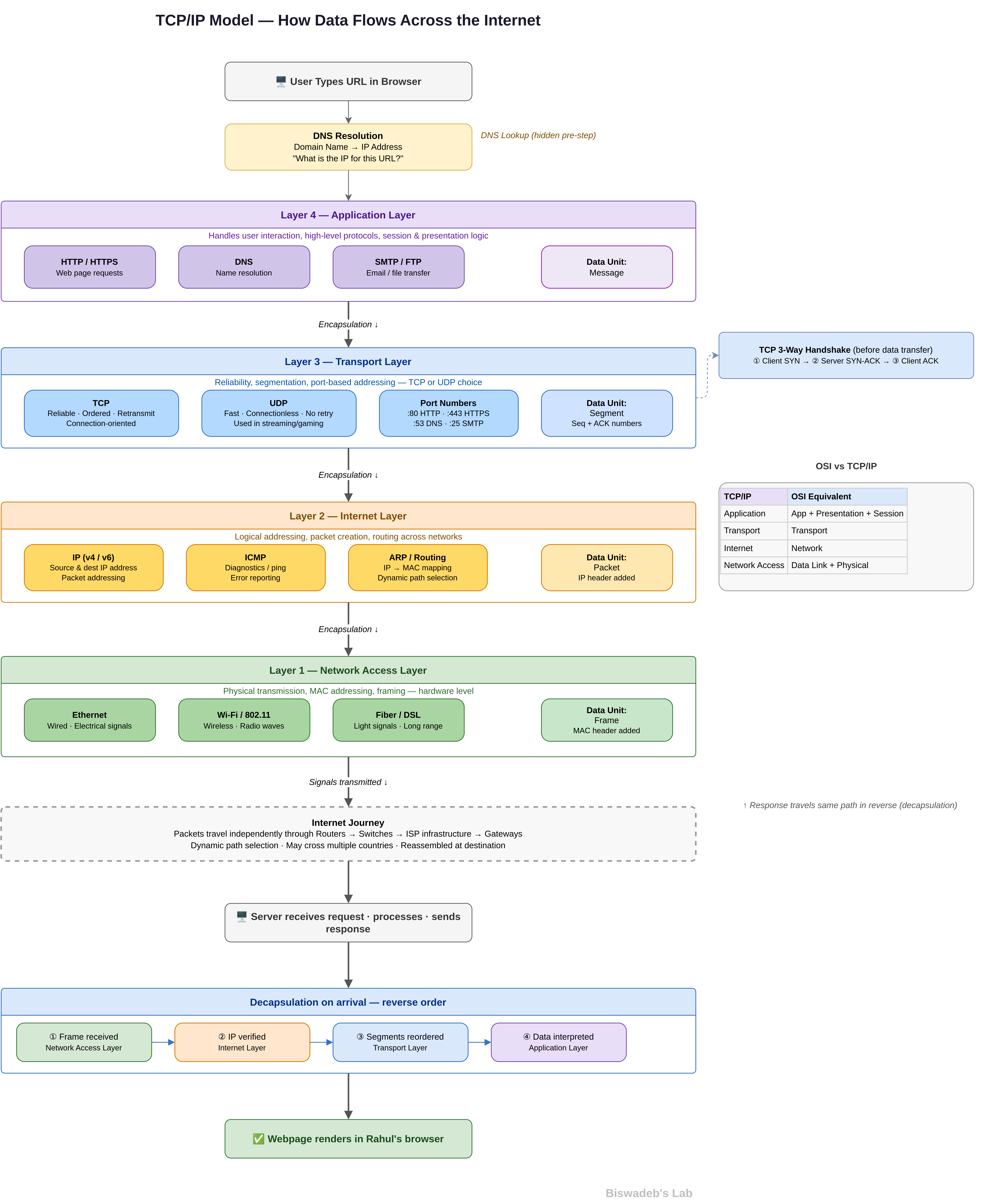
Right from the beginning, Rahul notices something different. Instead of memorizing layers, he starts following a real scenario.
The Same Click, A Different Understanding
Rahul opens his browser again. He types a URL and presses enter.
However, this time, he does not think in terms of seven layers. Instead, he follows how the TCP/IP model processes the request step by step.
As a result, the entire process feels more practical and grounded.
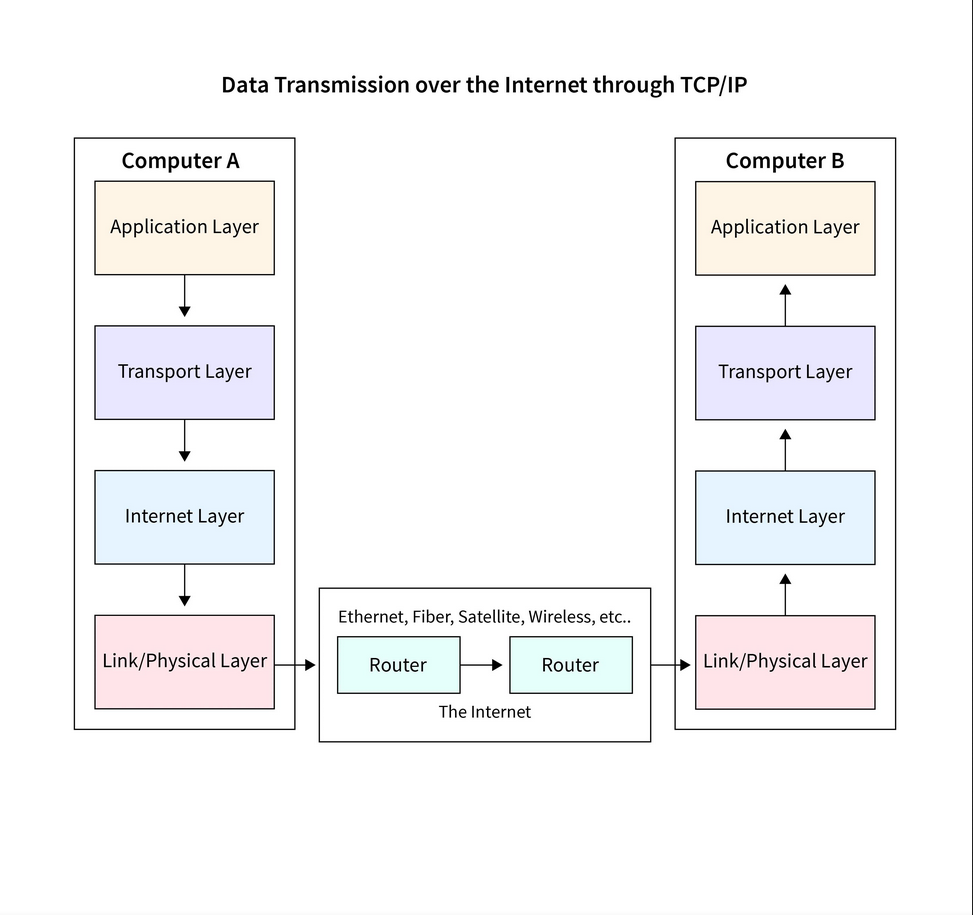
Layer 4 — Application Layer: Where Everything Begins
First, Rahul interacts with the application layer.
This layer combines multiple responsibilities from the OSI model. Instead of separating concerns, it handles everything related to user interaction and high-level protocols.
Here, Rahul’s browser creates a request using:
- HTTP or HTTPS
- DNS for domain resolution
- Possibly other protocols depending on the service
For example, when Rahul enters a URL, the system first needs to resolve the domain name into an IP address. Therefore, a DNS request gets triggered immediately.
At this stage, Rahul does not see complexity. However, multiple processes already begin working together.
Before Moving Forward: The Hidden DNS Step
Before the actual data request moves forward, Rahul’s system performs a DNS lookup.
It asks:
“What is the IP address of this domain?”
The request travels to a DNS server, which responds with the correct IP address. Only after this step can the real communication begin.
So, even before the TCP/IP layers fully process the request, an essential lookup already takes place.
Layer 3 — Transport Layer: Reliability vs Speed
Next, the transport layer takes control.
At this point, Rahul’s system must decide how to send the data. It chooses between two major protocols:
- TCP (Transmission Control Protocol) → Reliable, connection-based
- UDP (User Datagram Protocol) → Faster, connectionless
Since Rahul is loading a webpage, the system selects TCP.
Then, several important actions happen:
- The data gets broken into segments
- Each segment gets a sequence number
- A connection gets established using a handshake
- Lost packets get retransmitted if needed
Because of this, Rahul receives complete and correctly ordered data.
The TCP Handshake: Establishing Trust
Before sending actual data, TCP performs a three-way handshake:
- SYN → Rahul’s system requests a connection
- SYN-ACK → Server acknowledges
- ACK → Rahul confirms
Only after this process does data transmission begin.
As a result, both systems trust the connection and maintain reliability.
Layer 2 — Internet Layer: Routing Across the World
Now, the internet layer determines where the data should go.
It assigns:
- Source IP (Rahul’s device)
- Destination IP (the server)
Then, routers across the internet decide the best path.
However, this path is not fixed. Instead, routers dynamically adjust routes based on:
- Network congestion
- Availability
- Efficiency
Therefore, Rahul’s request may travel through multiple countries and networks before reaching its destination.
Packets in Motion
At this stage, Rahul’s data transforms into packets.
Each packet carries:
- Source and destination IP
- Payload (actual data)
- Routing information
These packets travel independently. Later, the transport layer ensures they reassemble correctly.
Layer 1 — Network Access Layer: Real-World Transmission
Finally, the network access layer handles actual transmission.
This layer includes:
- Physical medium (Wi-Fi, Ethernet, fiber)
- MAC addressing
- Frame creation
Here, data converts into signals:
- Electrical signals for cables
- Light signals for fiber
- Radio waves for wireless
At this point, the data physically travels across infrastructure.
The Internet Journey
Now Rahul’s request moves across the internet.
It passes through:
- Routers
- Switches
- Gateways
- ISP infrastructure
At every hop, devices read the packet and forward it closer to its destination.
Although Rahul sees a simple loading screen, a complex system actively works behind the scenes.
The Server Responds
Eventually, the request reaches the server.
The server processes Rahul’s request and prepares a response. Then it sends the data back through the same TCP/IP layers.
However, this time, the process reverses.
Decapsulation: Rebuilding the Data
As the response arrives, each layer processes it step by step:
- Network access layer receives signals
- Internet layer verifies routing
- Transport layer reorders segments
- Application layer interprets the data
Because of this structured process, Rahul’s system reconstructs the original content perfectly.
The Final Output
Finally, Rahul sees the webpage.
Images load. Text appears. Everything functions smoothly.
From Rahul’s perspective, it feels instant. However, behind the scenes, multiple layers coordinated with precision.
What Rahul Understands Now
At first, Rahul thought networking meant memorizing models.
However, now he understands something deeper.
- The TCP/IP model represents real-world implementation
- Each layer performs a clear function
- Data moves as a structured process
- Protocols actively interact at every stage
Therefore, instead of memorizing layers, Rahul now visualizes data flow.
TCP/IP vs OSI: Rahul’s Realization
Rahul compares both models again.
- OSI provides a detailed conceptual framework
- TCP/IP provides a practical implementation
While OSI breaks everything into seven layers, TCP/IP simplifies it into four.
As a result:
- OSI helps in learning
- TCP/IP helps in real networking
Why This Matters
Understanding the TCP/IP model allows Rahul to:
- Debug network issues
- Analyze packet flow
- Understand protocol behavior
- Think like a system instead of a user
Therefore, this knowledge becomes practical, not just theoretical.
The Bigger Picture
Every time Rahul:
- Opens a website
- Sends a request
- Streams content
…the TCP/IP model operates behind the scenes.
It does not announce itself. However, it silently ensures everything works.
Final Takeaway
The TCP/IP Model is not just a concept.
It is the backbone of the internet.
Once Rahul understands this, he stops seeing networking as abstract layers. Instead, he sees a living system where data constantly moves, transforms, and reaches its destination.
Final Thought
If the OSI model teaches structure…
Then the TCP/IP model shows execution.
And once Rahul understands both, he does not just learn networking.
He starts understanding how the internet actually thinks.
References
- Internet Engineering Task Force — https://www.ietf.org/
- Cisco Systems — https://www.cisco.com/
- IBM — https://www.ibm.com/docs/
- Computer Networking: A Top-Down Approach — https://gaia.cs.umass.edu/kurose_ross/index.php
Rahul, if you understood how the TCP/IP model actually works, drop a comment below.





Leave a Reply