
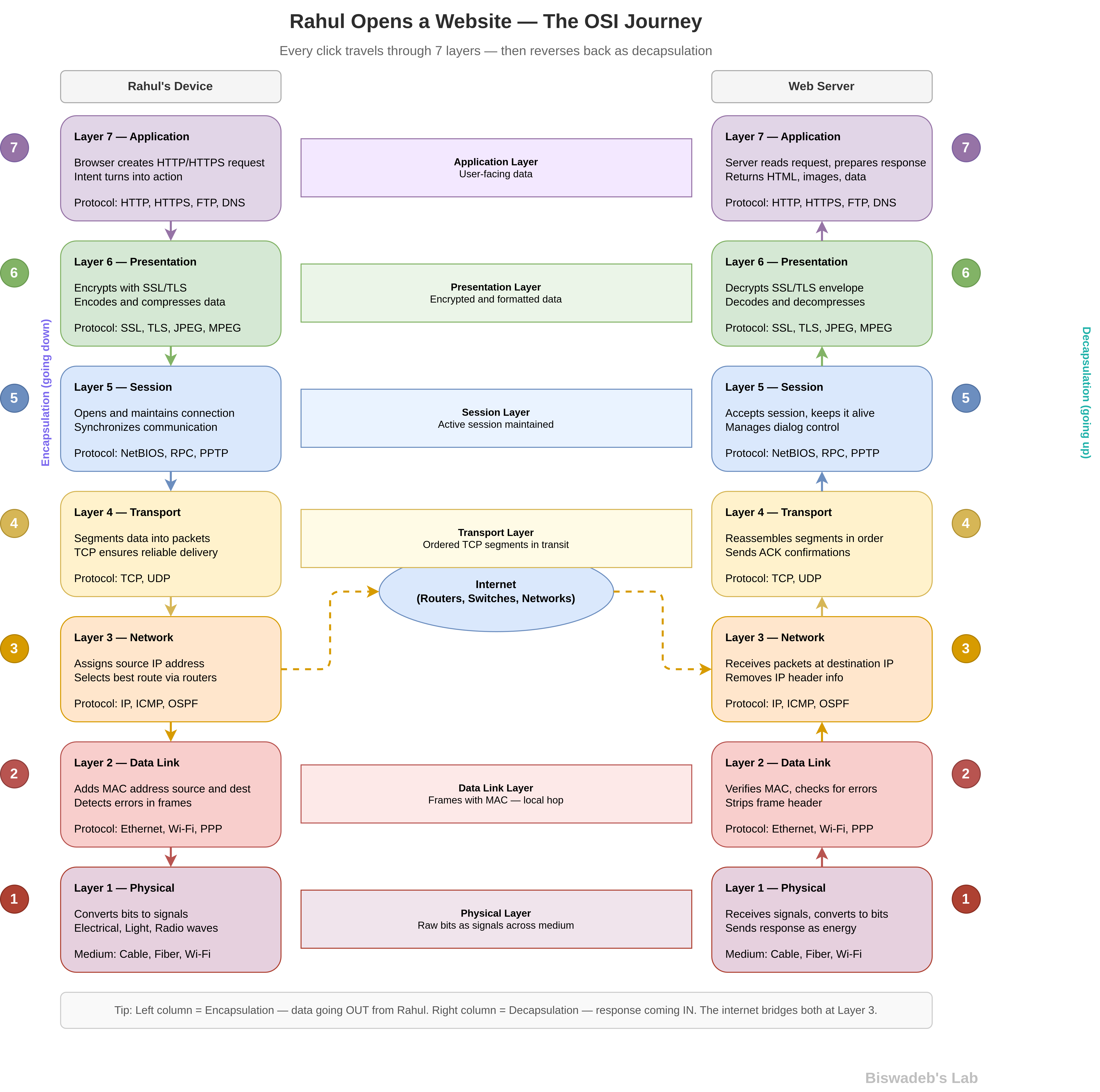
Rahul wants to learn the OSI Model, so he opens a blog to understand how it actually works in real-world networking. Instead of memorizing seven layers, he wants to see what really happens when he opens a website.
Right from the start, this blog takes a different approach. Rather than throwing definitions, it walks him through a live scenario.
Where It All Starts
Rahul opens his browser and types a URL. Then he hits enter.
At that moment, his system does not just “send a request.” Instead, it begins a structured journey through the OSI Model. Each layer actively processes the data before passing it forward.
So, rather than thinking in theory, Rahul now follows the actual flow.
Layer 7 — Application Layer: Rahul’s Entry Point
First, Rahul interacts with the application layer.
Here, his browser creates an HTTP or HTTPS request. This layer directly connects user actions with network communication. Rahul clicks a link, and immediately, the system prepares a meaningful request.
So, this is where intent turns into action.
Layer 6 — Presentation Layer: Structuring the Data
Next, the presentation layer steps in.
It formats the data so the receiving system can understand it correctly. At the same time, it handles encryption, encoding, and compression.
For example, if Rahul visits a secure site, this layer encrypts his data using SSL/TLS.
As a result, the data becomes both readable and secure before it travels further.
Layer 5 — Session Layer: Keeping Things Connected
After that, the session layer establishes a connection.
It keeps the communication active between Rahul’s system and the server. In addition, it manages synchronization and ensures the session does not break midway.
Therefore, Rahul does not need to reconnect for every small interaction.
Layer 4 — Transport Layer: Delivering Data Properly
Now, the transport layer takes control.
It breaks the data into smaller segments. Then it ensures reliable delivery using protocols like TCP.
Because of this:
- Data arrives in order
- Missing pieces get retransmitted
- Errors get corrected
As a result, Rahul receives complete and accurate information instead of corrupted data.
Layer 3 — Network Layer: Choosing the Path
Next, the network layer decides where the data should go.
It assigns IP addresses and selects the best route across multiple networks. Routers continuously analyze paths and forward the data efficiently.
So, instead of a straight line, the data travels through a dynamic path across the internet.
Layer 2 — Data Link Layer: Local Network Handling
Then, the data link layer handles local delivery.
It uses MAC addresses to ensure the data reaches the correct device within Rahul’s network. At the same time, it detects errors before forwarding the data.
Therefore, the system maintains accuracy at the local level before global transmission.
Layer 1 — Physical Layer: Signals in Motion
Finally, the physical layer converts everything into signals.
Depending on the medium, it sends:
- Electrical signals through cables
- Light through fiber optics
- Radio waves through Wi-Fi
At this stage, the data becomes physical energy moving across infrastructure.
What Happens Next?
Now the data travels across the internet.
It passes through routers, switches, and multiple networks. At every step, systems process and forward the data intelligently.
Eventually, it reaches the destination server.
The Reverse Journey Begins
Once the server responds, everything reverses.
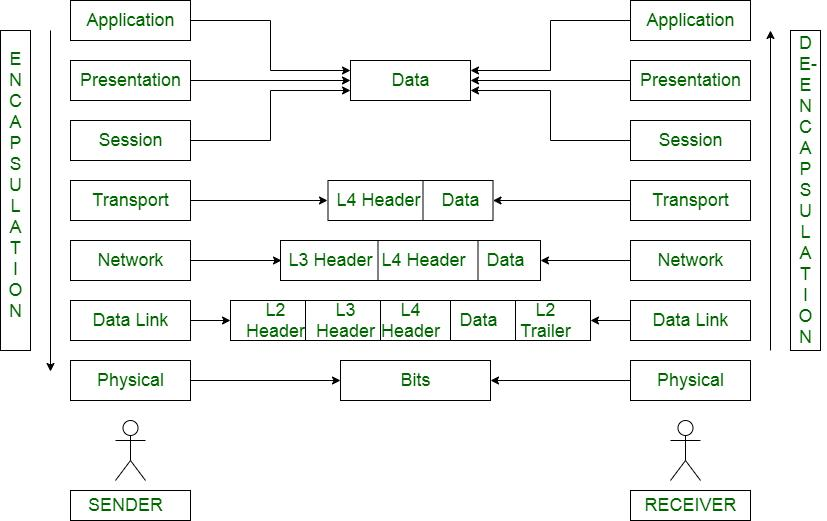
The data moves back through all seven layers. However, this time, each layer removes its own formatting step by step.
This process is called decapsulation.
As a result, Rahul’s system reconstructs the original data correctly.
The Final Output
Finally, Rahul sees the webpage load.
Images appear. Text becomes readable. Everything works smoothly.
From his perspective, it feels instant. However, behind the scenes, multiple layers worked together in a precise sequence.
What Rahul Actually Learned
At first, Rahul wanted to “learn the OSI Model.”
However, now he understands something much deeper.
- The OSI Model is not just theory
- It represents real data flow
- Each layer has a clear responsibility
- The system works as a pipeline, not a list
Therefore, instead of memorizing layers, Rahul now visualizes the process.
The Real Takeaway
The OSI Model explains how modern communication works.
Whenever Rahul:
- Opens a website
- Sends a message
- Streams a video
…the same layered process runs in the background.
So, once you understand this model, you stop guessing how networks work.
Instead, you start seeing the system clearly.
Final Thought
If you treat the OSI Model as a diagram, you will forget it.
However, if you follow Rahul’s journey, you will understand it as a living process.
And that’s where real learning begins.
References
Here are some reliable resources Rahul you must explore:
- International Organization for Standardization — OSI reference model standard
https://www.iso.org/standard/20269.html - Cisco Systems — Practical explanation of OSI layers
https://www.cisco.com/c/en/us/products/switches/what-is-a-network-switch.html - IBM — OSI model concepts and networking basics
https://www.ibm.com/docs/en/aix/7.2?topic=concepts-open-systems-interconnection-model - Microsoft — Networking fundamentals and layered architecture
https://learn.microsoft.com/en-us/windows/win32/cossdk/open-systems-interconnection-model - Computer Networking: A Top-Down Approach — Modern, application-first networking perspective
https://gaia.cs.umass.edu/kurose_ross/index.php - Data Communications and Networking — Deep dive into OSI layers and protocols
https://www.mheducation.com/highered/product/data-communications-networking-forouzan/M9780073376226.html - Internet Engineering Task Force — Real-world protocol standards (TCP/IP)
https://www.ietf.org/
Rahul, if you understood the OSI Model through this, drop a comment below. But this is not the end, Next you should visit the TCP/IP Model for better understanding of networking





Leave a Reply