
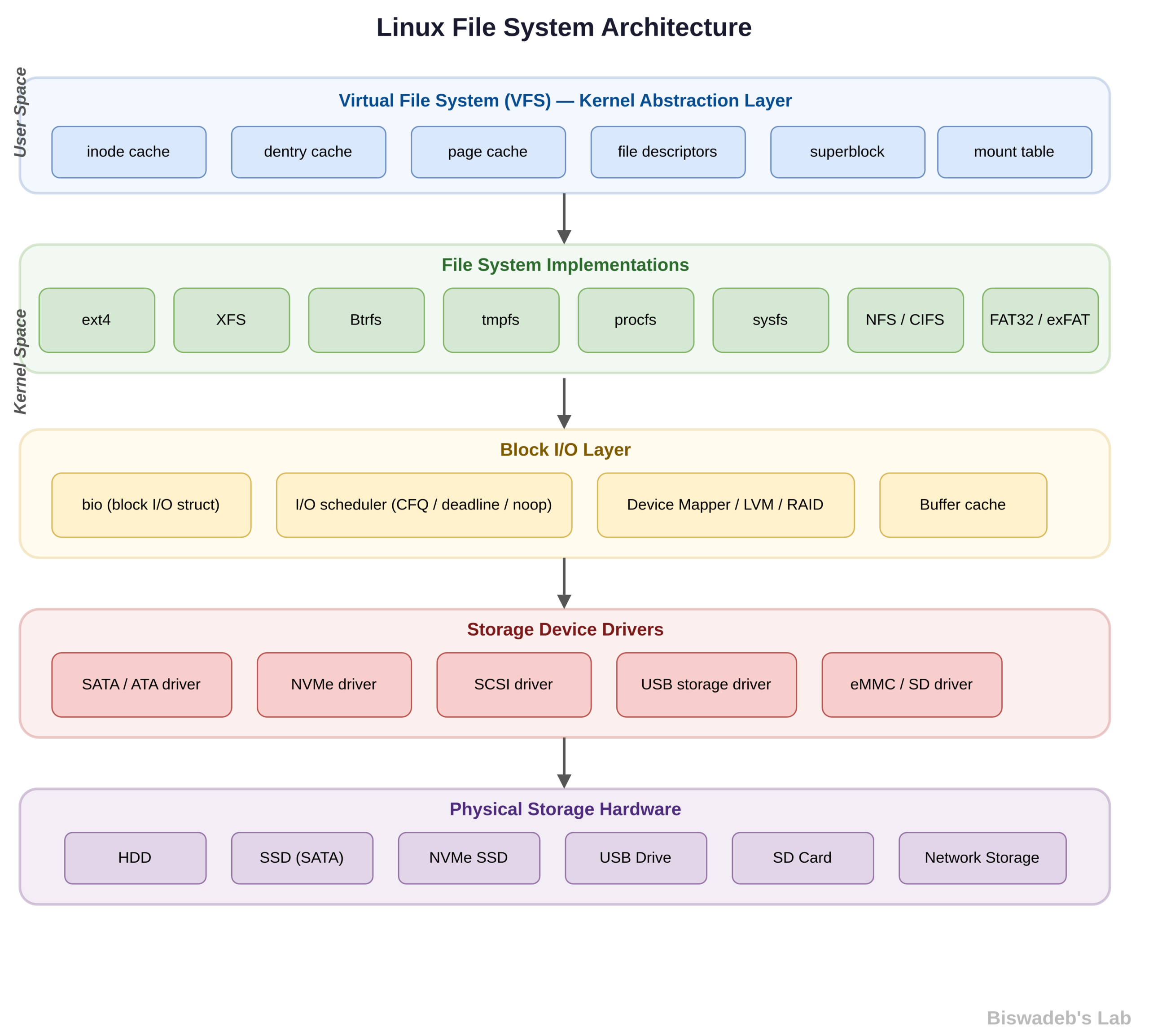
Introduction
The Linux filesystem forms the backbone of every Linux operating system. Unlike platforms that depend on drive letters and fragmented layouts, Linux uses a unified and hierarchical structure. As a result, users can navigate and manage data more efficiently. Moreover, this design gives administrators and developers precise control over how systems store and access data.
Whether you manage servers, build applications, or explore cybersecurity, you must understand the Linux filesystem. In this guide, you will learn its structure, major components, filesystem types, and practical management strategies. Additionally, you will discover how to optimize performance and maintain system integrity.
Before You Continue
If you haven’t read our previous articles on operating system fundamentals, we recommend reviewing them first for better context:
These guides will help you understand system behavior and process management, which directly relate to how the Linux filesystem operates.
What is a Filesystem in Linux?
A filesystem in Linux defines how the operating system stores, organizes, and retrieves data. In other words, it acts as a structured framework that controls how files exist on storage devices.
Furthermore, Linux supports multiple filesystem types, which increases its flexibility. You can use these filesystems on physical disks, partitions, or even virtual environments. Therefore, Linux adapts easily to both personal and enterprise use cases.
The Linux Filesystem Hierarchy
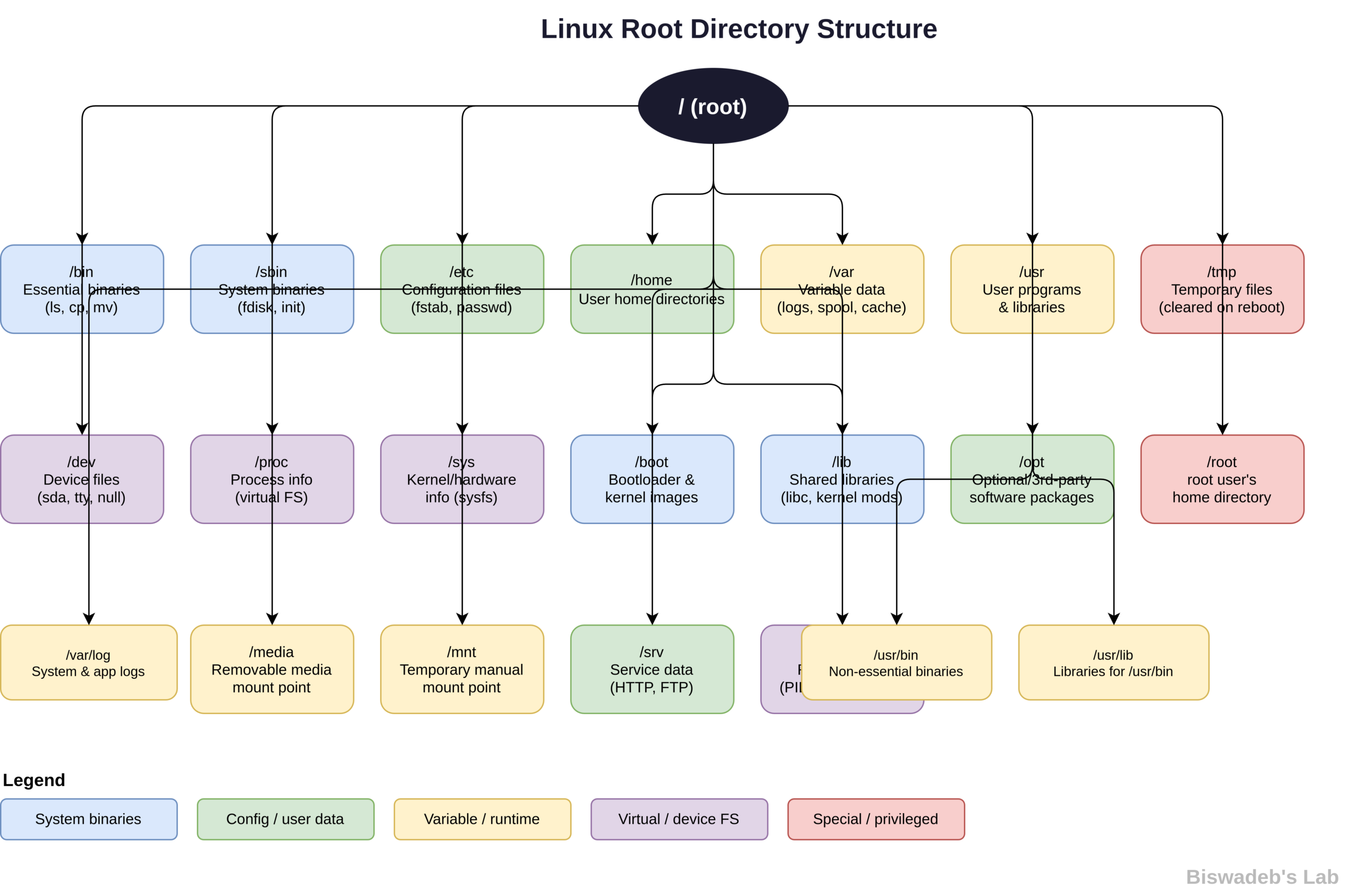
Linux follows a hierarchical directory structure, which begins at the root directory:
/
Unlike Windows, Linux avoids separate drive letters. Instead, it organizes everything under a single root. Consequently, users experience a consistent and logical file structure across the system.
Key Directories in Linux
Below are the most important directories you should understand. Each one plays a specific role in system organization.
1. Root Directory (/)
The root directory serves as the starting point of the entire filesystem. All other directories branch from this location. Therefore, it forms the foundation of Linux file organization.
2. /home
The /home directory stores user-specific data. Each user gets a dedicated folder for personal files and configurations. As a result, Linux maintains separation between users and improves security.
3. /etc
The /etc directory contains system-wide configuration files. Administrators store service settings, network configurations, and system policies here. Consequently, this directory becomes critical for system management.
4. /bin and /sbin
The /bin directory holds essential user commands such as ls, cp, and mv. Meanwhile, /sbin stores administrative tools used for system-level operations. Therefore, both directories ensure that critical commands remain accessible.
5. /var
The /var directory stores variable data such as logs, caches, and application data. Since this data changes frequently, the system updates this directory constantly. As a result, monitoring /var helps track system activity.
6. /usr
The /usr directory contains user applications, libraries, and utilities. In most systems, it occupies a large portion of storage. Therefore, it plays a key role in software management.
7. /tmp
The /tmp directory stores temporary files created by users and applications. Typically, the system clears these files during reboot. Hence, it prevents unnecessary storage consumption.
8. /dev
The /dev directory represents hardware devices as files. For example, disks, terminals, and USB devices appear here. Consequently, Linux treats hardware interactions in a consistent and simplified way.
9. /proc
The /proc directory provides real-time system and process information. However, it does not store actual files on disk. Instead, the system generates this data dynamically.
10. /mnt and /media
Linux uses /mnt and /media to mount external storage devices. For instance, USB drives and external disks become accessible through these directories. Therefore, users can integrate additional storage seamlessly.
Types of Linux Filesystems
Linux supports several filesystem types, each designed for specific workloads. Choosing the right one improves performance and reliability.
1. Ext4 (Fourth Extended Filesystem)
Ext4 remains the most widely used Linux filesystem. It delivers strong performance and reliability.
Key Features:
- Supports large files and volumes
- Uses journaling for crash recovery
- Maintains backward compatibility
2. XFS
XFS handles large-scale data efficiently. Therefore, enterprises often use it for high-performance environments.
3. Btrfs (B-tree Filesystem)
Btrfs introduces advanced capabilities such as snapshots and self-healing. In addition, it includes built-in RAID support. As a result, it suits modern storage systems.
4. FAT32 and NTFS
Linux supports FAT32 and NTFS for compatibility with Windows systems. Consequently, users can transfer data across platforms without issues.
5. Swap Filesystem
The swap filesystem acts as virtual memory. When RAM fills up, the system uses swap space to maintain performance. Therefore, it prevents system crashes under heavy loads.
How Linux Manages Files
Linux treats everything as a file, including devices and processes. This approach simplifies system interaction and enhances flexibility.
Each file includes:
- Inode: Stores metadata such as permissions and ownership
- Data Blocks: Store the actual content
As a result, Linux separates file information from data storage, which improves efficiency.
File Permissions in Linux
Linux enforces a strict permission model to control access. It uses three basic permissions:
r (read) | w (write) | x (execute)
These permissions apply to:
- Owner
- Group
- Others
For example:
-rwxr-xr--
This structure ensures controlled and secure access. Therefore, administrators can protect sensitive data effectively.
Mounting in Linux
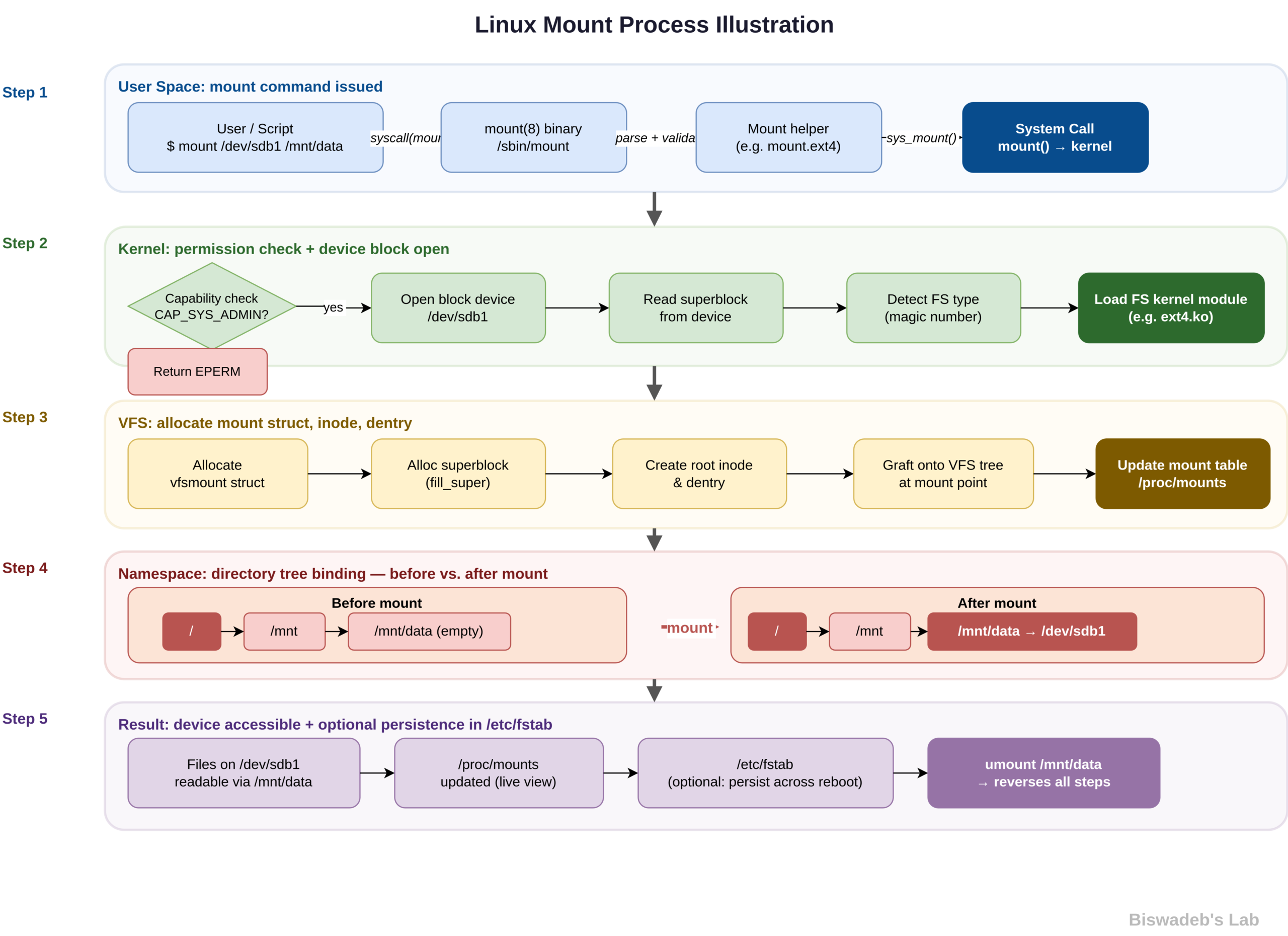
Mounting connects a filesystem to a directory. For example:
/mnt/usb
Once mounted, the system integrates the device into the directory structure. As a result, users can access files as if they exist locally.
Journaling in Linux Filesystems
Journaling protects data integrity. Before the system writes changes, it records them in a journal. If a crash occurs, the system recovers data using this log.
Ext4, XFS, and Btrfs all support journaling. Therefore, they reduce the risk of data corruption.
Virtual Filesystems
Linux uses virtual filesystems to expose system information dynamically.
/procshows process data/sysdisplays hardware details
Since these filesystems do not store real data, the system generates their content on demand. Consequently, they provide real-time insights.
Best Practices for Managing Linux Filesystems
To maintain efficiency and reliability, follow these best practices.
1. Choose the Right Filesystem
Select ext4 for general use, XFS for performance, and Btrfs for advanced features. As a result, you optimize system behavior.
2. Perform Regular Backups
Always back up important data using tools like rsync or tar. Therefore, you protect against data loss.
3. Monitor Disk Usage
Use commands such as:
df -h
du -sh
These tools help track storage usage. Consequently, you avoid unexpected issues.
4. Manage File Permissions Carefully
Set correct permissions to prevent unauthorized access. In addition, review them regularly.
5. Use Separate Partitions
Divide storage into partitions like /, /home, and /var. This strategy prevents one section from consuming all disk space.
6. Enable Journaling
Always use journaling filesystems. As a result, you reduce the impact of system crashes.
Advantages of the Linux Filesystem
The Linux filesystem offers several benefits:
- Flexible and scalable design
- Strong security through permissions
- Support for multiple filesystem types
- Efficient handling of devices and processes
- Reliable performance in server environments
Challenges and Limitations
Despite its strengths, Linux presents some challenges:
- Beginners face a learning curve
- Permission management requires attention
- Some proprietary systems show compatibility issues
Conclusion
The Linux filesystem defines how systems store and manage data. Its hierarchical structure, flexibility, and advanced features make it a powerful tool for both individuals and enterprises. Moreover, it allows precise control over storage and security.
By understanding its structure and applying best practices, you can improve performance, enhance security, and maintain system stability. Therefore, mastering the Linux filesystem becomes essential for anyone working with Linux.
In the long run, this knowledge helps you build efficient, secure, and scalable systems.
References
The following resources provide additional insights into Linux filesystems, system architecture, and related concepts:
- Linux Kernel Documentation — https://www.kernel.org/doc/html/latest/filesystems/
- GNU Project Documentation — https://www.gnu.org/software/coreutils/manual/
- The Linux Foundation Resources — https://training.linuxfoundation.org/resources/
- Ext4 Filesystem Overview — https://ext4.wiki.kernel.org/
- XFS Documentation — https://xfs.org/
- Btrfs Documentation — https://btrfs.readthedocs.io/









Leave a Reply